
Best Capture Devices for Streamers of 2026
Introduction
If you have ever tried to stream directly from your console's built-in "Share" button, you have likely encountered the harsh reality of creative limitations. You are stuck with a basic layout, limited audio control, and a quality cap that often looks muddy on high-resolution displays. A dedicated capture card acts as a high-speed translator, taking the raw HDMI signal from your console and feeding it into your PC. This allows you to use professional broadcasting software like OBS to add overlays, high-quality microphones, and webcams, transforming a hobbyist stream into a polished production.
Choosing the right hardware requires navigating a minefield of technical specifications. You have to balance passthrough capabilities - what you see on your gaming monitor - against capture resolutions - what your viewers see on Twitch or YouTube. A common pain point is the "latency" or delay between your controller input and the action on screen. Modern cards utilize high-bandwidth connections like USB 3.2 or PCIe to ensure that this lag is virtually imperceptible, allowing you to play and broadcast simultaneously without feeling like you are gaming in quicksand.
Best for Most Streamers: Elgato Game Capture HD60 X
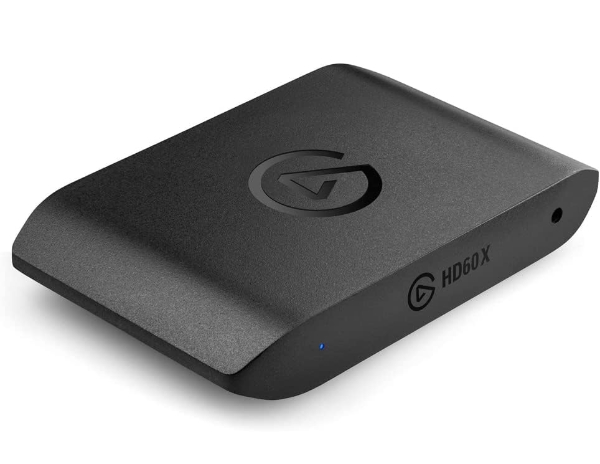
The HD60 X is widely considered the gold standard for external cards because it respects the capabilities of modern consoles. While it captures at 1080p60 - the standard for most streaming platforms - it allows you to play your games in full 4K60 HDR10. Most importantly, it supports Variable Refresh Rate (VRR). In plain English, VRR prevents "screen tearing" or stuttering when a game's performance dips, ensuring your personal gaming experience remains buttery smooth even while the card is working hard to broadcast.
Technically, the HD60 X stands out due to its UVC (USB Video Class) compliance. Why it matters: You don't have to install bulky, proprietary drivers that slow down your computer. It's essentially a "plug-and-play" device that your PC recognizes as a high-end webcam. It also features a dedicated 3.5mm analog audio input, which is a lifesaver for console players who need to capture party chat from a controller or headset without complicated software workarounds.
The primary limitation is that it does not support 4K capture at high frame rates; it is strictly a 1080p-focused broadcast tool. For those deeply embedded in the Elgato ecosystem, the integration with Stream Deck is seamless. However, if you are looking for 4K streaming specifically, you might find the resolution ceiling frustrating. For the 90% of Twitch streamers who broadcast at 1080p, this is the most reliable, "no-fuss" solution on the market.
VRR synchronizes the refresh rate of your monitor with the output of your console. Why It Matters: Without VRR passthrough, using a capture card would disable this feature, causing jagged lines and stuttering on your screen during intense action. The HD60 X ensures your game feels exactly as it should.
Best for High Refresh Rates: AVerMedia Live Gamer ULTRA 2.1 (GC553G2)
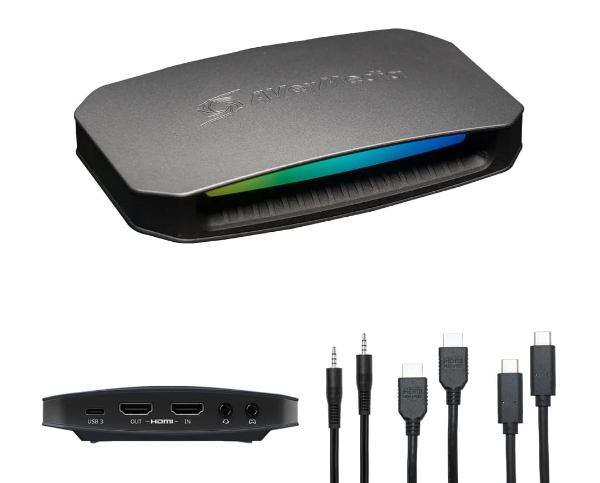
The AVerMedia Live Gamer ULTRA 2.1 is one of the first mainstream external cards to utilize HDMI 2.1 technology. This is the "high-occupancy vehicle lane" of video cables. It allows for a massive jump in passthrough specs, supporting 4K at 144Hz. If you own a high-end gaming monitor and want to play competitive shooters at frame rates higher than 60fps while streaming, this is currently the only external box that won't hold your monitor back.
The standout technical feature is its support for 4K60 capture. While most cards downscale your footage to 1080p for the computer, this unit keeps every pixel of that 4K signal intact for high-quality YouTube uploads. Why it matters: If you are a content creator who does both live streaming and high-fidelity video essays, this one card handles both duties without requiring you to switch hardware or compromise on "crispness."
However, this power comes at the cost of complexity. To achieve these speeds, you must use a USB-C 3.2 Gen 2 port on your PC. If your computer is more than a few years old, you likely don't have the necessary "bandwidth" (data speed) to run this card at its full potential. It also features RGB lighting, which some may find distracting or unnecessary. It is a future-proof investment, but only if your PC has the ports to back it up.
HDMI 2.1 supports up to 48Gbps (Gigabits per second). Why It Matters: Older cards use HDMI 2.0 (18Gbps), which forces you to choose between 4K resolution or high frame rates. HDMI 2.1 lets you have both simultaneously, which is essential for the latest consoles.
Best Internal Card: Elgato 4K Pro
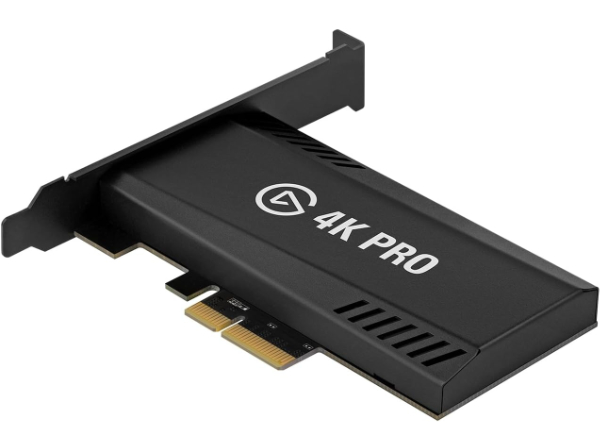
For dedicated desktop PC users, an internal card like the Elgato 4K Pro is the pinnacle of stability. It plugs directly into your motherboard's PCIe slot, eliminating the common headaches of USB cable management and connection drops. This direct connection offers the highest possible "bus speed," allowing the card to handle 8K60 passthrough and 4K60 HDR10 capture with zero thermal throttling (overheating).
Technically, this card is a beast because of its Multi-App support. Why it matters: Standard USB capture cards can usually only be "seen" by one program at a time. The 4K Pro allows you to use your console feed in OBS to stream, while simultaneously having it open in Elgato's 4K Capture Utility to record a clean 4K copy of your gameplay for later editing. This is a game-changer for creators who want to archive their best moments in maximum quality without stream overlays covering the action.
The "friction" here is purely physical: you have to be comfortable opening your PC and installing it. It also requires a 4x PCIe slot, which might be blocked if you have a massive modern graphics card. There is no analog audio port here, so all sound must be handled digitally via HDMI or PC software. It's the ultimate "set it and forget it" solution for professional-tier creators who have a dedicated streaming PC.
PCIe (Peripheral Component Interconnect Express) slots provide a direct path to your PC's processor. Why It Matters: Direct motherboard connections have significantly lower latency than USB. This translates to a more responsive "preview window" in your streaming software.
Best Mid-Range Value: Razer Ripsaw HD
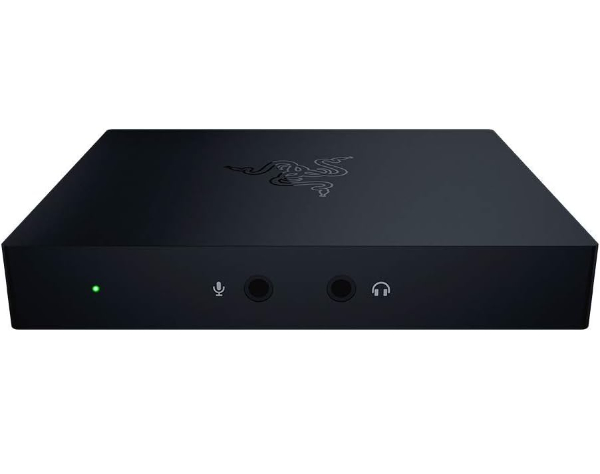
The Razer Ripsaw HD is a straightforward, reliable workhorse that skips the flashy features to focus on core performance. It captures at 1080p60 while allowing 4K60 passthrough. It doesn't support VRR or high refresh rates, but for many Nintendo Switch or PS4/Xbox One players, those extra specs would be "overkill" and an unnecessary expense. It's a compact, matte-black box that blends into any desk setup without demanding attention.
A specific technical highlight is the hardwired audio mixing. It features dedicated 3.5mm jacks for both a microphone and a headphone "aux" input. Why it matters: You can plug a second audio source directly into the card to mix it with your game sound before it even reaches your computer. This simplifies your "audio chain," reducing the risk of your voice and game sound being out of sync - a common and frustrating issue in live broadcasting.
The trade-off is the lack of specialized software. Razer's Synapse software handles some settings, but it isn't nearly as robust as Elgato's suite. Furthermore, without VRR support, PS5 or Series X users may notice occasional screen tearing on their gaming monitor. It is best suited for the "no-nonsense" streamer who wants a reliable 1080p broadcast and values physical audio inputs over high-end software features.
Analog audio signals are mixed via onboard circuitry. Why It Matters: Software-based audio mixing in OBS can sometimes introduce a "delay" of several milliseconds. Mixing at the hardware level ensures your commentary happens exactly when the action does.
Best Minimalist Setup: NZXT Signal HD60
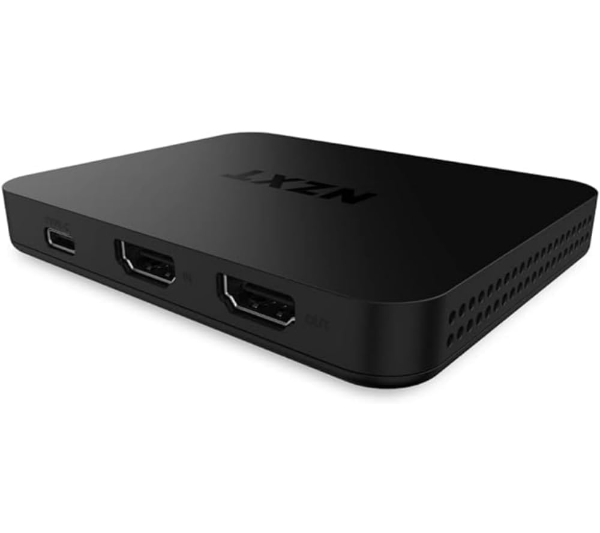
The NZXT Signal HD60 is designed for the creator who wants the technology to get out of the way. It is incredibly slim - roughly the size of a smartphone - and draws all its power directly from the USB-C port. It targets the 1080p60 capture sweet spot, making it perfect for the Nintendo Switch or standard PS5 streaming. Unlike other cards that try to do everything, the Signal HD60 focuses on having the lowest possible latency for its price bracket.
The technical win here is its full compatibility with any software that supports a video feed, from OBS to Zoom to Discord. Why it matters: Many cards require you to use "bridge" software that can be glitchy. The Signal HD60 uses a standard video protocol that just "works" the moment you plug it in. This makes it a great choice for "cross-functional" users who might use their capture card for gaming on Tuesday and a professional remote presentation on Wednesday.
The obvious limitation is its 1080p passthrough. If you have a 4K monitor, this card will force your console to output in 1080p, making your game look significantly blurrier to you while you play. This is a significant compromise for "next-gen" console owners. However, if you are still gaming on a 1080p display, you won't notice a difference, and you'll save a considerable amount of money compared to the high-end 4K passthrough models.
The card operates on 5V DC power from the USB bus. Why It Matters: No external power bricks are required. This reduces cable clutter and "interference hum" that can sometimes occur when using multiple power outlets for audio and video equipment.
How We Chose These Products
Our evaluation process focused on the "Zero-Failure" principle. We prioritized cards that maintain a stable connection over hours of high-temperature use. We specifically looked for Chroma Subsampling support (ensuring colors don't look "smeared") and UVC Compliance to ensure the broadest possible compatibility across Windows and Mac. We analyzed manufacturer whitepapers to verify that stated frame rates were "native" and not achieved through "interlacing," which can cause flickers in fast-moving games.
Comparison Overview
| Model | Capture Quality | Passthrough | Interface | Best For |
|---|---|---|---|---|
| Elgato HD60 X | 1080p60 HDR | 4K60 HDR / VRR | USB 3.0 | Twitch Standard |
| AVerMedia Ultra 2.1 | 4K60 | 4K144 / 4K120 HDR | USB 3.2 Gen 2 | High Refresh Gaming |
| Elgato 4K Pro | 4K60 HDR10 | 8K60 / 4K240 | PCIe x4 | Pro Streaming PCs |
| Razer Ripsaw HD | 1080p60 | 4K60 | USB 3.0 | Audio Mixing |
| NZXT Signal HD60 | 1080p60 | 1080p60 | USB 3.0 | Budget/Switch |
Buying Guide: What to Look For
- Passthrough vs. Capture: Never buy a card based on "Capture" specs alone. Ensure the "Passthrough" matches your monitor's resolution and refresh rate so you aren't forced to play a blurry version of your game.
- Latency (Instant Gameview): Look for cards that mention "Low Latency" or "UVC." This ensures that what you see in your streaming software is happening in real-time, allowing you to react to stream alerts without looking away from your game.
- HDR Support: If you play on an OLED or high-end LED TV, you need a card that supports HDR Passthrough. Without it, your game colors will look washed out and grey when the capture card is plugged in.
- Port Compatibility: External 4K cards require high-speed USB ports (3.1 or 3.2). Check your PC's motherboard manual; plugging a high-end card into a slow USB 2.0 port will result in a "Device not found" error or severe lag.
General Pro / Cons
| Pros | Cons |
|---|---|
| Total control over stream layouts and overlays | Initial setup can be technically demanding |
| Allows use of high-end XLR microphones via PC | Adds significant "cable clutter" to your desk |
| Enables high-fidelity 4K recording for YouTube | Expensive models require modern, high-speed PC ports |
| Zero impact on console system performance | Can introduce audio sync issues if not configured correctly |
| Internal cards offer unmatched connection stability | Cheaper cards often limit your own gaming resolution |
| UVC cards work instantly without driver installs | High-end features like VRR are still priced at a premium |
Final Summary
For the vast majority of console players, the Elgato HD60 X strikes the best balance, protecting your 4K gaming experience while delivering a flawless 1080p broadcast. If you are a competitive player who demands 144Hz speeds, the AVerMedia Ultra 2.1 is the only external path forward. Professional desktop users should look no further than the Elgato 4K Pro for its unparalleled stability. While capture cards represent a significant financial and technical hurdle, they are the single most important investment for anyone serious about building a community around their gameplay. Aggregate rating of the products reviewed: 4.7 out of 5.