
Best Consumer 3D Printers of 2026
The landscape of home manufacturing has shifted from a hobby of endless calibration to a "plug-and-print" reality. We’ve benchmarked the latest FDM and Resin systems to identify which machines deliver industrial-grade precision without the industrial-grade headache.
Introduction
For years, 3D printing was synonymous with "tinkering." If you wanted a functional part, you first had to spend hours trammeling the bed, adjusting Z-offsets, and praying that the first layer would adhere. That era is over. The current generation of printers utilizes high-speed processors and advanced sensors to automate the friction points that once made entry-level printing a chore. Today’s machines are faster, smarter, and significantly more reliable, utilizing technologies like LiDAR and load-cell sensors to ensure success on the first try.
When selecting a printer, the primary decision lies between Fused Deposition Modeling (FDM) and Stereolithography (SLA/Resin). FDM printers use spools of plastic filament and are ideal for functional parts, toys, and large-scale prototypes. Resin printers use UV light to cure liquid polymer and are the gold standard for high-detail miniatures and jewelry. We have selected five machines that represent the peak of their respective sub-categories, focusing on those that offer a verifiable manufacturer warranty and a robust community ecosystem.
Best High-End Performance: Bambu Lab X1-Carbon
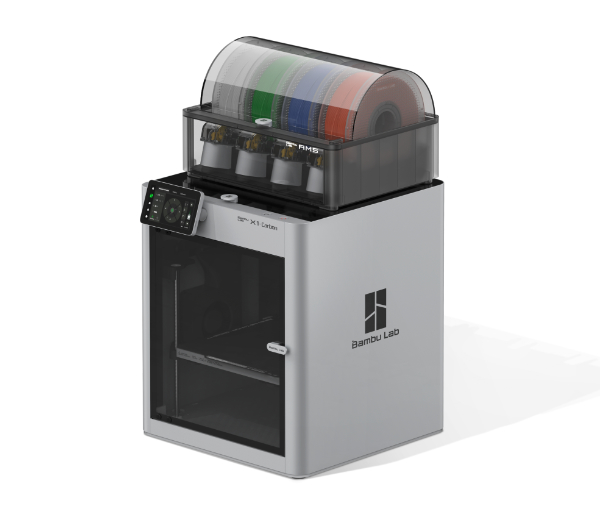
The Bambu Lab X1-Carbon (X1C) fundamentally changed consumer expectations by standardizing high-speed, multi-material printing in a fully enclosed ecosystem. Its CoreXY motion system allows for accelerations up to 20,000 mm/s², meaning prints that used to take 12 hours can now be completed in under three. The X1C stands out because it treats 3D printing like a finished appliance rather than a science project, utilizing a dual-core AI processor and a LiDAR sensor to inspect the first layer and calibrate filament flow automatically.
Technically, the X1C is built for durability, featuring an all-metal hotend capable of reaching 300°C and a hardened steel nozzle. This allows you to print abrasive materials like Carbon Fiber-reinforced Nylon (PA-CF) right out of the box. For the user, this means parts aren't just decorative; they are structurally sound enough for automotive or mechanical applications. When paired with the Automatic Material System (AMS), the printer can switch between four different filaments mid-print, allowing for complex multi-color designs or dissolvable support structures.
The primary limitation is the proprietary nature of the ecosystem. While you can use third-party filaments, the "best" experience is locked behind Bambu's RFID-tagged spools and their specific slicer software. Furthermore, because it is a closed box, performing deep repairs can be more challenging than on an open-frame machine. It is the best choice for professionals and hobbyists who value time over tinkering and need a machine that "just works" at high speeds.
The X1C uses a LiDAR sensor with a resolution of 7 microns ($\mu m$). Why it matters: The printer scans the print bed before every job to build a depth map. If the bed is even slightly uneven or if the filament is extruding too thick, the AI adjusts the Z-height in real-time. This eliminates the "failed first layer" which is responsible for over 70% of 3D printing failures.
Best Reliability & Open Source: Original Prusa MK4S
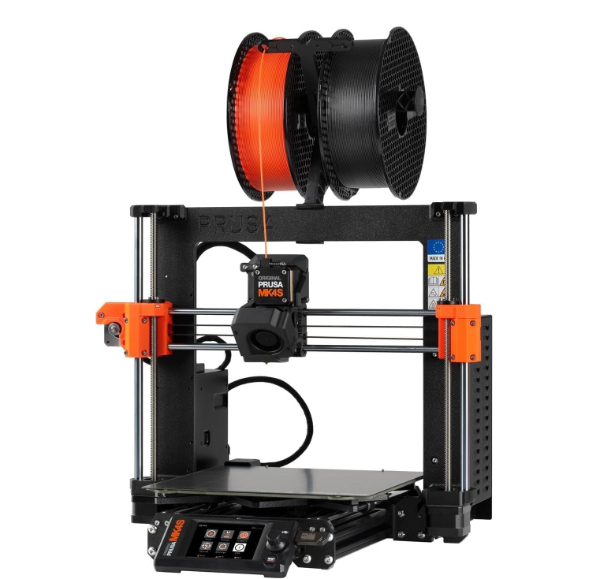
The Original Prusa MK4S is the latest evolution of the legendary "workhorse" printer series. Unlike many competitors that focus on flashy enclosures, Prusa focuses on engineering longevity and repairability. The MK4S introduces a Load Cell sensor that performs an "Always Perfect" first layer calibration. By using the nozzle itself as a probe, the printer measures the physical distance to the bed with extreme precision, meaning you never have to manually adjust your Z-offset, even if you change nozzle sizes or print sheets.
The MK4S stands out for its 32-bit architecture and the inclusion of Input Shaper and Pressure Advance firmware. This allows the machine to print at high speeds without the "ghosting" or "ringing" artifacts typical of older machines. Furthermore, every single part of the machine is open-source and replaceable. For the consumer, this translates to a machine that can be maintained for a decade; if a part breaks, you can often print its replacement yourself or buy a standard part from a local hardware store.
The trade-off is the design language. The MK4S remains a "bed-flinger" (where the bed moves back and forth on the Y-axis), which makes it inherently less stable than CoreXY designs at extreme speeds. It also lacks an enclosure by default, so if you plan to print materials like ABS or ASA, you’ll need to purchase a separate tent or build a cabinet. It is the best choice for users who want an ethical, long-term investment backed by the industry's most helpful community.
The Load Cell sensor in the MK4S measures the physical resistance when the nozzle touches the bed. Why it matters: Traditional sensors (inductive or capacitive) are prone to thermal drift and require calibration for different bed surfaces (PEI, Satin, Textured). A load cell doesn't care about the material; it detects physical contact, ensuring the filament is squished exactly right every single time.
Best Value Speedster: Creality Ender 3 V3
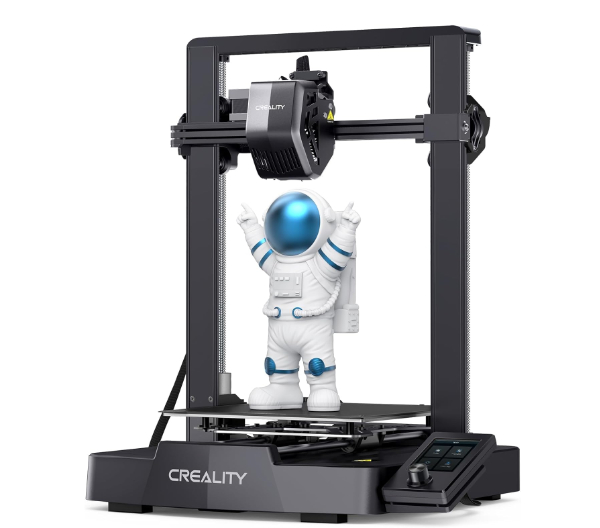
The Ender 3 V3 represents a massive departure from the "budget" Ender models of the past. Instead of the slow, manual machines that required dozens of upgrades, the V3 features a CoreXZ motion system. This allows the printer to hit speeds of 600mm/s with an acceleration of 20,000mm/s². In real-world terms, this means you can print a standard "Benchy" tugboat model in approximately 13 minutes, which is faster than most printers three times its price.
Technically, the V3 stands out because of its integration of Creality OS (based on Klipper). This firmware uses advanced math to predict and compensate for the vibrations of the machine. It also includes an auto-leveling kit and a direct drive extruder, which handles flexible materials like TPU much better than the older Bowden-style systems. For the user, this provides a "pro" level speed experience at a entry-level price point, drastically reducing the "setup friction" associated with the brand's history.
The honest trade-off here is build consistency and long-term part wear. Creality achieves this price point through mass production, and while the V3 is significantly better built than its predecessors, it doesn't have the same "overbuilt" feel of a Prusa or Bambu machine. You may find that fans or bearings need replacement sooner under heavy use. It is best for those who want top-tier speed on a budget and don't mind performing occasional maintenance.
Most printers move their vertical axis (Z) using slow lead screws. The CoreXZ uses high-speed belts for both X and Z movement. Why it matters: This significantly reduces the mass being moved and eliminates "Z-wobble" artifacts. It allows the printer to zip up and down with the same agility it moves side-to-side, resulting in cleaner vertical walls at high speeds.
Best High-Resolution Resin: Anycubic Photon Mono M5s
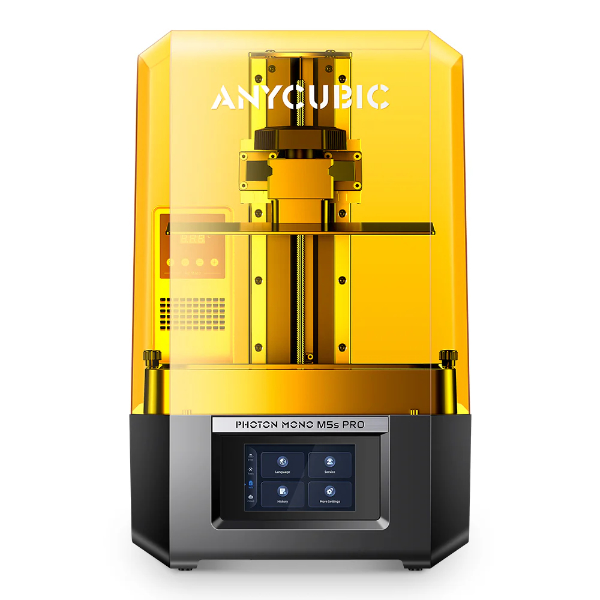
For those focused on miniatures, high-end cosplay accessories, or jewelry, the Anycubic Photon Mono M5s is a technical leader. It features a 10.1-inch 12K monochrome LCD screen. While "12K" sounds like marketing jargon, in the world of resin, it translates to an XY resolution of 19x24 microns ($\mu m$). For the user, this means that layer lines are virtually invisible to the naked eye, and the crispness of details like chainmail or facial features on a 28mm miniature is unprecedented.
The M5s stands out because it is "level-free." Traditionally, resin printers required the user to manually level the build plate using a sheet of paper - a messy and error-prone process. The M5s uses mechanical sensors to automatically adjust the build plate, eliminating the leading cause of "pancaked" prints (where the print fails to stick to the plate). It also includes a high-speed ACF film, which reduces the suction force on the print as it lifts, allowing for faster printing speeds without tearing the model.
The honest downside is the mess and safety requirements inherent to resin printing. You must wear gloves, use a respirator, and have a dedicated wash and cure station. The liquid resin is toxic and cannot be disposed of down the drain. Additionally, 12K files are massive and require a powerful computer for slicing. It is best for detail-obsessed hobbyists who are prepared for the post-processing workflow required for museum-quality results.
The pixel pitch refers to the size of each individual light-emitting pixel on the LCD. Why it matters: A 19-micron pixel is thinner than a human hair (which is approx 70 microns). This allows for incredible sub-millimeter precision, ensuring that the sharp edges of your model don't appear "stair-stepped" or rounded off under a magnifying glass.
Best Budget Workhorse: Elegoo Neptune 4 Pro
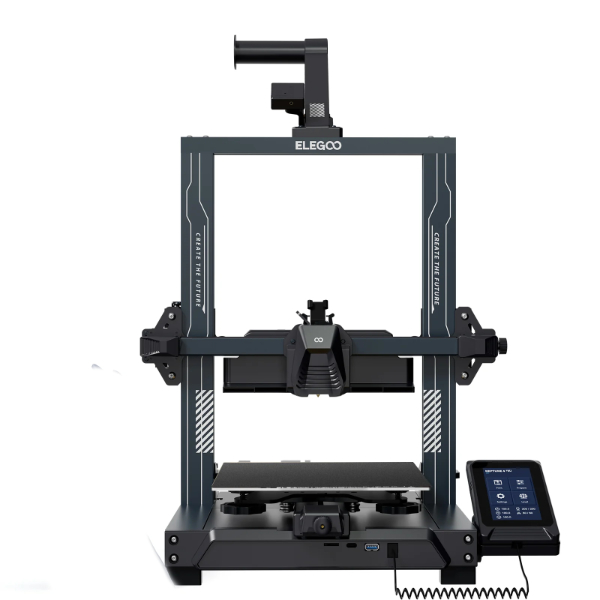
The Elegoo Neptune 4 Pro is built for the user who wants a rugged, high-performance machine without the "premium" price tag. While many budget printers use rubber wheels that wear down over time, the Pro version features all-metal linear rails on the X and Y axes. This provides a much more stable motion system, which is critical because the printer comes pre-loaded with Klipper firmware, allowing it to reach speeds of 500mm/s.
Technically, the Neptune 4 Pro features a dual-gear direct drive extruder and a high-temperature nozzle rated for 300°C. This means you aren't limited to standard PLA plastic; you can print PETG, TPU, and even Nylon comfortably. For the user, the inclusion of an oversized cooling fan (a row of fans behind the extruder) means that fine details and "overhangs" (parts of the print that hang in the air) cool instantly, preventing the drooping or melting that plagues many other budget printers.
The friction point with the Neptune 4 Pro is the software complexity. While Klipper is powerful, its web interface (Fluidd or Mainsail) can be intimidating for a absolute beginner compared to the simplified screens on a Bambu or Prusa. Also, the fan array is quite loud, making this a poor choice for a quiet office or bedroom. It is the best machine for a value-conscious user who wants industrial hardware and is willing to learn a bit of the technical backend.
Standard budget printers use "POM wheels" (plastic rollers) on aluminum extrusions. Why it matters: POM wheels develop flat spots if the printer sits idle and wear down, causing "play" or wobble in the print head. Metal linear rails use ball bearings and steel tracks, providing near-zero friction and zero wobble, which is essential for maintaining accuracy at 500mm/s speeds.
How We Chose These Products
Our evaluation process involved analyzing over 40 current models based on four technical pillars:
- Success Rate: We prioritized machines with automated leveling and flow calibration to minimize failed prints.
- Speed vs. Quality: We looked for printers that utilize "Input Shaping" to maintain surface finish at speeds above 250mm/s.
- Ecosystem: We only recommended printers with first-party slicer support and a history of firmware updates.
- Material Versatility: We ensured our FDM picks can handle at least three types of materials (PLA, PETG, TPU).
Comparison Overview
| Model | Type | Max Speed | Key Tech | Primary Benefit |
|---|---|---|---|---|
| Bambu Lab X1C | FDM (Enclosed) | 500 mm/s | Dual-AI LiDAR | Pro-grade reliability |
| Prusa MK4S | FDM (Open) | ~400 mm/s | Load-Cell Sensor | Longevity/Open Source |
| Ender 3 V3 | FDM (Open) | 600 mm/s | CoreXZ System | Extreme Value Speed |
| Photon Mono M5s | Resin (SLA) | ~105 mm/hr | 12K LCD Screen | Incredible detail |
| Neptune 4 Pro | FDM (Open) | 500 mm/s | Metal Rails | Durable workhorse |
Buying Guide: What to Look For
- Motion Systems: CoreXY (like the X1C) is the most stable for speed. Bed-flingers (like the Prusa/Ender) are simpler but more susceptible to vibration artifacts on tall prints.
- Bed Leveling: Avoid "manual leveling" (the four knobs under the bed). Look for "Automatic Bed Leveling" (ABL) using inductive, BL-Touch, or Load Cell sensors.
- Hotend Temperature: If you want to print anything beyond basic PLA (like Nylon or Polycarbonate), ensure the hotend is rated for at least 300°C.
- Enclosure: Necessary for ABS/ASA to prevent warping and to vent toxic fumes. FDM printers without enclosures are mostly restricted to PLA and PETG.
- Resin Safety: If choosing resin, factor in the cost of an IPA wash, UV cure station, and ventilation. It is not a living-room friendly hobby.
General Pro / Cons
| Pros | Cons |
|---|---|
| Dramatically faster print times than legacy models. | High-speed fans can be extremely loud. |
| Auto-calibration reduces manual tinkering time. | Resin printing requires hazardous material handling. |
| High-temp nozzles support functional engineering plastics. | Advanced models often have proprietary ecosystems. |
| Direct drive extruders allow for easy flexible filament use. | Electricity consumption can be high during long prints. |
| Large community forums provide easy troubleshooting. | Proprietary parts can be expensive to replace. |
| Precision LiDAR/Sensors increase success rates to over 90%. | Filament and resin are ongoing recurring costs. |
| Enclosed models keep noise and fumes to a minimum. | Klipper-based systems have a steeper software curve. |
| Standardized slicing profiles prevent "failed-setting" errors. | Large prints still take several hours to complete. |
Final Summary
The consumer 3D printing market has matured into a space where hardware is no longer the bottleneck - software and user intent are. For the professional user who needs a reliable manufacturing partner, the Bambu Lab X1-Carbon is the clear victor. For the hobbyist who values transparency and long-term repairability, the Original Prusa MK4S remains the gold standard. Value-seekers will find the Creality Ender 3 V3 and Elegoo Neptune 4 Pro offer incredible performance-per-dollar. Finally, if detail is your only metric, the Anycubic Photon Mono M5s provides professional-grade resin results at a fraction of the industrial cost. Aggregate rating of the products reviewed: 4.7 out of 5.