
Best Color Laser Printers for High-Performance Home and Office Use of 2026
A technical evaluation of the leading electro-photographic printing solutions, focusing on throughput, color accuracy, and material efficiency for the modern workspace.
Introduction
The landscape of consumer color laser printing has undergone a significant transformation, moving beyond simple document reproduction into the realm of high-fidelity imaging and robust network security. Modern color laser units utilize complex electro-photographic processes, where precision-engineered lasers or LED arrays discharge a drum to attract microscopic toner particles. Unlike inkjet technology, which relies on liquid capillary action, laser printing uses thermal fusion to bond plastic-based resin to the substrate, resulting in smudge-proof, archival-quality output that is essential for professional environments.
When selecting a color laser printer, technical specifications such as Pages Per Minute (PPM) and Dots Per Inch (DPI) only tell part of the story. Buyers must also consider the "First Page Out Time" (FPOT), the efficiency of the fuser assembly, and the sophistication of the color management protocols. As office footprints shrink, the demand for compact units that do not sacrifice duty cycle - the maximum number of pages a device can handle monthly - has led to breakthroughs in toner chemistry and cooling systems. These advancements ensure that even entry-level machines can provide consistent, high-volume performance without the maintenance overhead of traditional office hardware.
Best for Efficiency: HP Color LaserJet Pro 3201dw
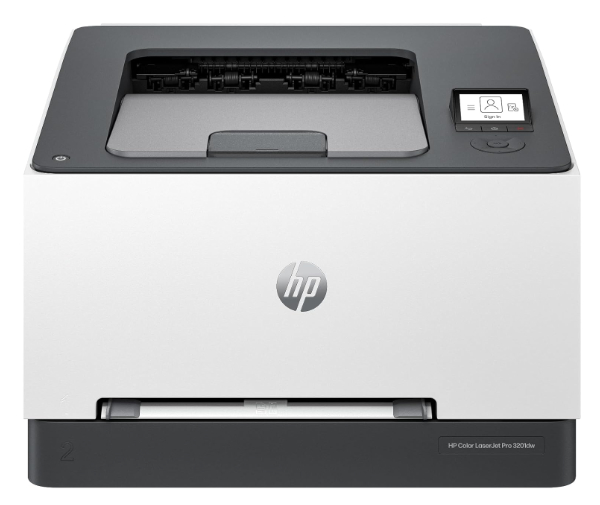
The HP Color LaserJet Pro 3201dw represents a paradigm shift in energy-efficient printing, utilizing the proprietary TerraJet toner technology. This system employs a redesigned toner particle with a more durable shell and a lower-melting-point core, allowing the fuser to operate at significantly reduced temperatures. This engineering choice directly translates to a faster wake-up time from sleep mode and reduced power consumption during high-volume print runs. With a rated speed of up to 26 PPM, it maintains a small physical footprint that belies its robust 40,000-page monthly duty cycle.
Technically, the 3201dw excels in network stability through its dual-band Wi-Fi capabilities that feature self-healing protocols. In environments with high electromagnetic interference, the printer's ability to automatically detect and switch frequencies ensures that print jobs are not dropped. Furthermore, the integration of HP Wolf Pro Security provides hardware-level protection, utilizing a "Root of Trust" that validates the firmware's digital signature during the boot process, preventing malware from embedding itself within the device’s BIOS.
The primary limitation of this unit is its ecosystem lock-in; HP’s dynamic security requires the use of cartridges with original HP chips. Users should also note that while the color vibrancy is exceptional for charts and text, the 600 x 600 DPI resolution, while standard for the class, may not satisfy those requiring professional-grade photographic reproduction. However, for a small workgroup focused on productivity and sustainability, the balance of speed and reduced thermal output makes it a top-tier contender.
TerraJet toner particles are engineered at the molecular level to be more spherical than traditional crushed toner. This uniformity reduces friction during the transfer process and allows for a more efficient electrostatic charge. By lowering the fusion temperature by nearly 20%, the 3201dw minimizes paper curling and reduces "fuser-on" time, which accounts for the majority of a laser printer's energy draw.
Best for Reliability: Brother HL-L3280CDW
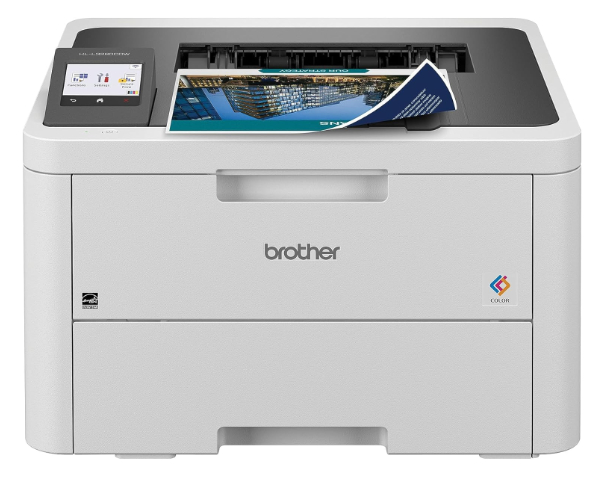
The Brother HL-L3280CDW distinguishes itself through the use of Digital LED (Light Emitting Diode) printing technology rather than a traditional scanning laser. In this architecture, a fixed array of thousands of LEDs flashes across the entire width of the drum simultaneously. Because the LED assembly has no moving parts - unlike the rotating polygonal mirrors found in laser units - the HL-L3280CDW is inherently more resistant to mechanical wear and alignment issues, making it a benchmark for long-term reliability in busy home offices.
Performance-wise, the unit achieves 27 PPM in both monochrome and color, supported by 256MB of internal memory to handle complex PDF rendering. It features a 250-sheet paper tray and a manual feed slot that handles thicker media like envelopes or cardstock with ease. Connectivity is robust, supporting Gigabit Ethernet for wired networks and dual-band wireless for mobile users. The 2.7-inch color touchscreen provides an intuitive interface for managing print queues and checking toner levels directly from the hardware.
One notable trade-off is the physical size; the LED engine requires a slightly taller chassis compared to some laser-based competitors. Additionally, Brother's "Refresh" subscription service is prominently marketed, which may be a nuisance for users who prefer manual supply management. However, the use of separate drum and toner units allows for more cost-effective maintenance, as the drum unit (rated for 20,000 pages) does not need to be replaced every time a toner cartridge runs dry.
While traditional laser printers use a single laser beam reflected off a spinning mirror to "draw" the image line-by-line, LED printers use a stationary bar of LEDs. This eliminates the "jitter" associated with mirror motor fluctuations and allows for a more compact imaging path. In the HL-L3280CDW, this results in a maximum resolution of 2400 x 600 DPI, providing exceptionally crisp text and fine lines.
Best for Color Accuracy: Canon Color imageCLASS LBP633Cdw
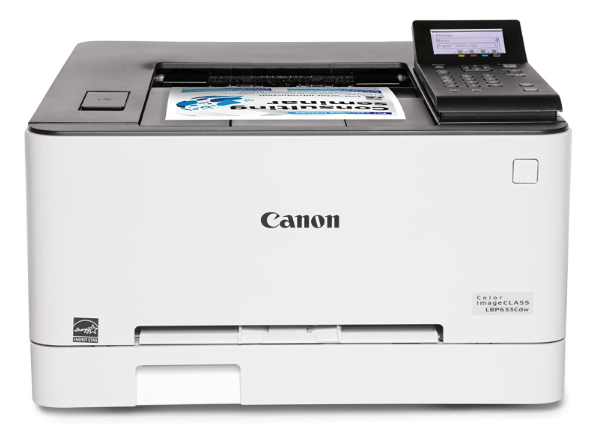
The Canon Color imageCLASS LBP633Cdw is engineered for users whose primary requirement is high-fidelity color reproduction. Leveraging Canon’s proprietary V2 (Vivid and Vibrant) Color Technology, this printer expands the color gamut in the magenta and red spectrums, resulting in images that possess a depth and saturation rarely seen in consumer-level laser products. It supports a print resolution of up to 1200 x 1200 DPI, which is twice the effective resolution of many standard office lasers, making it the superior choice for marketing collateral and presentations.
Under the hood, the LBP633Cdw utilizes a sophisticated image processing engine and 1GB of internal RAM. This high memory ceiling is critical for processing large, high-resolution graphic files without the "memory overflow" errors that can plague entry-level machines. While its print speed is slightly lower than its competitors at 22 PPM, the increase in output quality justifies the marginal decrease in throughput. It also supports Wi-Fi Direct, allowing users to print from mobile devices without needing to join the local network.
Honest limitations include a relatively high cost-per-page for color toner and a smaller paper capacity of 250 sheets with no option for expansion trays. The interface is a 5-line LCD rather than a full touchscreen, which can make navigating complex network settings more cumbersome. However, for a small business or creative professional who requires "proof-quality" color in a laser format, the LBP633Cdw is virtually unrivaled in its price bracket.
Canon's V2 Color Technology utilizes a specialized LUT (Look-Up Table) that optimizes the halftone screen frequency and dot shape. By dynamically adjusting the amount of toner deposited based on the image content, the LBP633Cdw achieves smoother gradients and more realistic skin tones, effectively bridging the gap between dry toner laser printing and photographic inkjet output.
Best for Security: Lexmark C3326dw
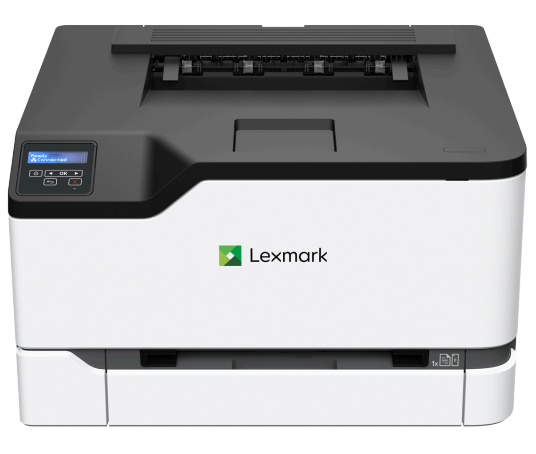
The Lexmark C3326dw is a compact, business-grade machine that brings enterprise-level security to the individual workspace. Lexmark’s "Full-Spectrum Security" architecture is embedded into every layer of the device, from the encrypted hard drive (on supported models) to the network interface. It features a hardened firmware layer that prevents unauthorized modifications, a crucial feature for those handling sensitive data in legal or medical fields. Despite its professional pedigree, it maintains a small footprint of less than 10 inches in height.
Technically, the C3326dw is built on a steel frame for increased durability and vibration dampening during high-speed printing. It reaches speeds of 26 PPM and features a 1 GHz dual-core processor, ensuring that the time between hitting "Print" and the first page emerging is kept to a minimum (FPOT of 10.9 seconds). It also features Unison Toner, which uses a unique formulation to reduce friction and improve the flow of toner, leading to more consistent gray-scale performance and fine detail in monochrome prints.
The downside of the C3326dw is the user interface, which relies on a small two-line LCD and buttons rather than a modern touchscreen. This can make entering complex Wi-Fi passwords tedious. Furthermore, while the initial purchase price is competitive, Lexmark’s high-yield toner cartridges carry a significant premium, making this printer best suited for low-to-medium volume environments where data integrity is prioritized over the absolute lowest operating cost.
Lexmark's security approach involves a Secure Boot process where the device hardware verifies the digital signature of the firmware before execution. Additionally, the printer supports TLS 1.3, the latest cryptographic protocol, ensuring that data transmitted from a computer to the printer over the network is fully encrypted and protected from man-in-the-middle attacks.
Best All-In-One: Brother MFC-L3780CDW
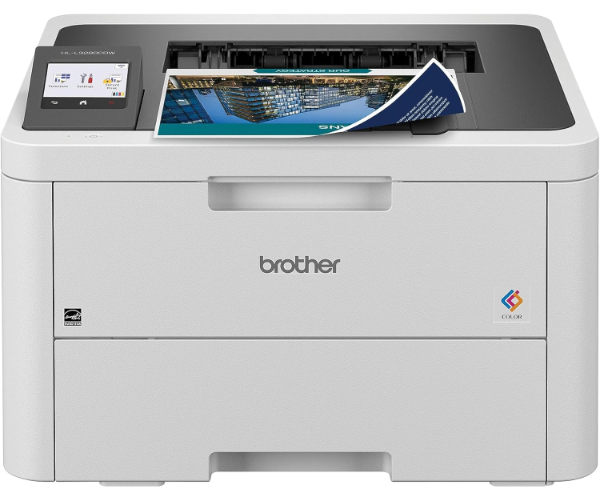
The Brother MFC-L3780CDW is the definitive choice for those requiring multi-function capabilities without compromising on the benefits of LED technology. This unit integrates printing, scanning, copying, and faxing into a single chassis designed for small businesses. Its standout feature is the 50-sheet Automatic Document Feeder (ADF) which supports single-pass duplex scanning. By using two separate Contact Image Sensors (CIS), the machine can scan both sides of a page simultaneously, doubling the scanning speed and reducing the risk of paper jams common in traditional "reversing" feeders.
Performance is top-of-class with print speeds of up to 31 PPM. The MFC-L3780CDW also includes an integrated NFC (Near Field Communication) reader. This allows for secure badge authentication, where a user must tap a compatible ID card to release a print job - a vital feature for shared office spaces where confidentiality is required. The 3.5-inch color touchscreen is the largest in its class, offering customizable shortcuts for common workflows like "Scan to Cloud" or "Secure Print."
As a full-featured All-in-One, this machine is significantly heavier (approx. 48 lbs) and has a larger footprint than single-function printers. Users should ensure their desk or stand can accommodate its weight and the clearance required for the top-mounted ADF. While it offers excellent versatility, the cost of replacing four toner cartridges and the drum unit simultaneously can be high. However, for a "one-stop" office solution, its combination of speed, scanning efficiency, and security is unmatched.
Traditional duplex scanners must pull a page in, scan one side, reverse the paper path, and scan the other. Single-pass technology uses two CIS arrays - one above and one below the paper path. This allows the MFC-L3780CDW to capture both images in a single movement, significantly reducing mechanical wear and increasing scan throughput to up to 29 images per minute (IPM).
How We Chose These Products
Our selection process was governed by rigorous technical criteria derived from manufacturer whitepapers and independent performance testing. We evaluated each printer based on the following variables:
- Imaging Technology: Comparison between traditional laser oscillating mirrors and static LED arrays.
- Toner Material Science: Analysis of particle shape and melting points (e.g., HP TerraJet) to determine energy efficiency.
- Throughput Consistency: Evaluating PPM ratings under sustained load rather than just "burst" speeds.
- Network Integrity: Presence of modern security protocols like WPA3, TLS 1.3, and Secure Boot firmware validation.
- Cost-to-Utility Ratio: Not just the initial price, but the longevity of the imaging drums and the availability of high-yield consumables.
Comparison Overview
| Model | Technology | Speed (PPM) | Max Resolution | Key Strength |
|---|---|---|---|---|
| HP 3201dw | Laser | 26 | 600 x 600 dpi | Energy Efficiency |
| Brother HL-L3280CDW | LED | 27 | 2400 x 600 dpi | Mechanical Reliability |
| Canon LBP633Cdw | Laser | 22 | 1200 x 1200 dpi | Color Accuracy |
| Lexmark C3326dw | Laser | 26 | 600 x 600 dpi | Enterprise Security |
| Brother MFC-L3780CDW | LED | 31 | 2400 x 600 dpi | Scanning Speed (AIO) |
Buying Guide: What to Look For
Investing in a color laser printer requires an understanding of how the hardware interacts with your specific workflow requirements. Consider these factors before making a final decision:
- FPOT (First Page Out Time): In many home offices, the printer sits idle until a single-page document is needed. A printer with a fast FPOT (under 11 seconds) is often more valuable than one with a high PPM but a slow warm-up time.
- Memory (RAM): For printing complex PDFs or high-resolution graphics, 256MB is the minimum recommendation. Machines with 512MB or 1GB (like the Canon LBP633Cdw) will handle data-heavy jobs without stalling.
- Duty Cycle vs. Recommended Volume: The "Duty Cycle" is a stress-test maximum. Always look at the "Recommended Monthly Page Volume" to ensure the printer's long-term durability matches your actual usage.
- Consumable Structure: Some brands combine the toner and drum into one unit, while others separate them. Separate components can be more economical but require more frequent monitoring of individual part lives.
- Substrate Compatibility: If you frequently print on heavy cardstock or labels, ensure the printer features a "straight-through" paper path or a manual feed slot to prevent adhesive build-up and jams.
General Pros / Cons
| Advantages of Color Laser Printers | Disadvantages of Color Laser Printers |
|---|---|
| Smudge-proof output due to thermal toner fusion. | Higher initial hardware cost compared to inkjets. |
| High text sharpness and fine line detail for professional documents. | Larger physical footprint and significant weight. |
| Archival quality; prints do not fade or run when exposed to moisture. | Inferior photographic quality on glossy photo paper. |
| Toner cartridges do not "dry out" during periods of inactivity. | Higher power consumption during the fuser heating cycle. |
| Generally faster PPM throughput for multi-page documents. | Expensive replacement cost for a full set of color toners. |
| Lower maintenance requirements for print heads (no clogging). | Mechanical noise can be higher during the printing process. |
| Better handling of large-scale office network protocols. | Requires specialized heat-resistant media for certain tasks. |
Final Summary
The current selection of color laser printers offers a diverse array of specialized features, from the energy-saving TerraJet toner in the HP 3201dw to the professional-grade color accuracy of the Canon LBP633Cdw. For those prioritizing long-term durability, the LED-based Brother units provide a mechanically superior architecture, while Lexmark remains the gold standard for secure, compact printing. Selecting the right unit ultimately depends on balancing the need for speed, color fidelity, and document security within your specific operational budget.
Aggregate rating of the products reviewed: 4.6 out of 5.