
Best Cordless Keyboards of 2026
An authoritative guide to the highest-performing wireless typing interfaces, evaluated on latency, switch engineering, and battery longevity.
Introduction
The evolution of cordless keyboard technology has reached a tipping point where the performance gap between wired and wireless peripherals has virtually vanished. Modern wireless protocols, such as proprietary 2.4GHz RF connections and Bluetooth Low Energy (BLE), now offer polling rates and stability that satisfy both competitive gamers and high-volume data entry professionals. Choosing the right interface involves navigating a complex landscape of switch types - ranging from tactile mechanical to ultra-low-profile scissor switches - and understanding the trade-offs between rechargeable lithium-ion cells and traditional alkaline batteries.
Technical considerations today extend beyond mere connectivity. We evaluate keyboards based on their actuation force, travel distance, and chassis rigidity. A high-quality wireless keyboard must manage power consumption intelligently without introducing "wake-up lag" that can disrupt a professional workflow. Furthermore, the integration of security protocols, such as the Logi Bolt system or Apple’s Secure Enclave for biometric data, has become a standard requirement for users handling sensitive information in shared or public environments.
Best for Productivity: Logitech MX Keys S
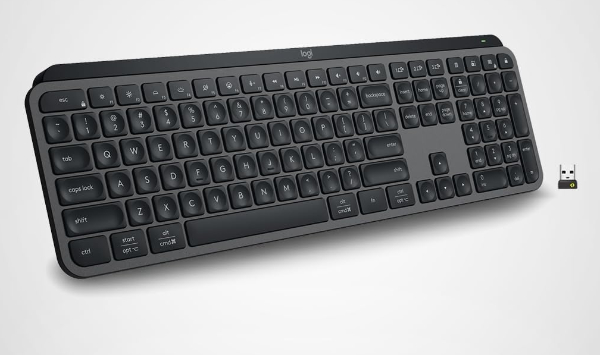
The Logitech MX Keys S represents the pinnacle of scissor-switch engineering. Utilizing "Perfect Stroke" keys, each keycap features a spherically dished design that matches the natural shape of fingertips, promoting a more fluid and accurate typing experience. The chassis is constructed from a single metal plate, providing remarkable stability that eliminates the "flex" often found in plastic-heavy wireless alternatives. This rigidity ensures that every millisecond of force is directed into the switch actuation rather than being absorbed by the frame.
Technically, the MX Keys S stands out for its Smart Illumination. Integrated proximity sensors detect hand approach to activate backlighting, while ambient light sensors adjust brightness dynamically to preserve battery life. Connectivity is handled via Bluetooth Low Energy or the proprietary Logi Bolt receiver, which provides a more secure, encrypted connection compared to standard Bluetooth - crucial for enterprise environments. The addition of "Smart Actions" via the companion software allows users to automate complex multi-app macros with a single keystroke, significantly boosting throughput for power users.
While the internal lithium-polymer battery can last up to 5 months with the backlighting disabled, heavy users who prefer full illumination will find themselves recharging every 10 days via the USB-C port. It is important to note that this is a low-profile membrane keyboard; users accustomed to the deep travel and auditory feedback of mechanical switches may find the experience too muted. However, for those in open-office plans or shared living spaces, its near-silent operation is an unmatched advantage.
Logitech Official Product PageBest for Gaming: Razer DeathStalker V2 Pro
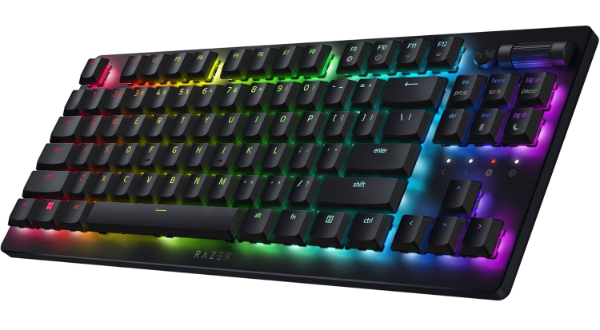
The Razer DeathStalker V2 Pro bridges the gap between high-speed gaming performance and low-profile ergonomics. At its core are the Razer Low-Profile Optical Switches, which utilize a beam of light to register keypresses. This eliminates the need for physical contact debouncing, resulting in near-instantaneous actuation and a lifespan of up to 70 million keystrokes. This technology is paired with Razer's HyperSpeed Wireless protocol, which has been independently verified to be faster than many wired keyboards in terms of end-to-end latency.
The keyboard is housed in an ultra-slim casing with a durable 5052 aluminum alloy top plate, ensuring it remains lightweight yet resistant to warping. For gamers, the multi-function roller and media button provide tactile control over volume and brightness without requiring focus to shift from the screen. It also supports three distinct Bluetooth profiles, allowing for seamless switching between a primary gaming PC, a tablet, and a laptop.
Limitations primarily revolve around the battery life when RGB lighting is maximized. While it is rated for up to 40 hours of use with its low-profile optical sensors engaged, running the Chroma RGB at 100% brightness will drain the unit much faster. Additionally, the proprietary software (Synapse) is required for full customization and can be resource-heavy on some systems. It is the ideal choice for those who want the speed of an optical gaming keyboard without the bulk of a traditional mechanical deck.
Razer Official Product PageBest Mechanical Enthusiast: Keychron Q1 Max
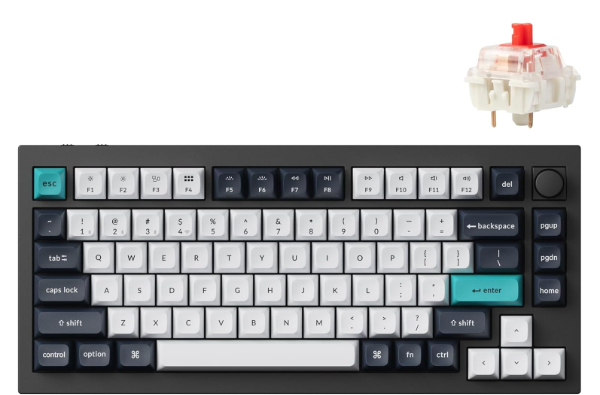
The Keychron Q1 Max is a masterpiece of custom keyboard engineering brought to the wireless market. Unlike mass-market plastic boards, the Q1 Max features a fully CNC-machined 6063 aluminum body and a double-gasket design. This internal mounting system adds silicone pads between the top and bottom cases, significantly reducing acoustic resonance and providing a cushioned, flexible typing feel that is highly sought after by mechanical keyboard purists.
Performance-wise, the Q1 Max utilizes a 2.4GHz wireless connection with a 1000Hz polling rate, ensuring it is viable for competitive tasks. It also features full QMK and VIA support, meaning users can remap any key or create complex macros through a web-based interface without installing proprietary bloatware. The inclusion of hot-swappable switch sockets allows for total customization - users can swap out the stock Gateron Jupiter switches for any 3-pin or 5-pin MX-style mechanical switches without soldering.
However, the heavy metal construction makes this keyboard significantly less portable than other cordless options; it is designed to stay on a desk. The battery life is respectable but not market-leading, largely due to the power requirements of its high-performance ARM Cortex-M4 MCU. For the user who wants the premium "thock" sound and tactile satisfaction of a custom mechanical keyboard with the convenience of wireless connectivity, the Q1 Max is unrivaled.
Keychron Official Product PageBest for Mac Ecosystem: Apple Magic Keyboard with Touch ID
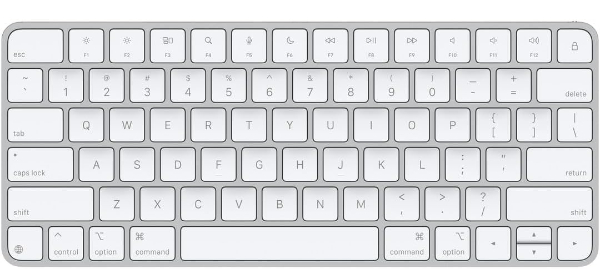
For users within the Apple ecosystem, the Magic Keyboard with Touch ID offers a level of hardware integration that third-party manufacturers cannot replicate. The standout feature is the Secure Enclave integration, which allows for biometric authentication directly from the keyboard. This enables instant unlocking of the Mac, secure Apple Pay transactions, and password management with a single fingerprint scan. The pairing process is handled automatically via a physical USB-C connection, which then transitions to a highly stable Bluetooth link.
The typing mechanism is a refined version of Apple’s scissor switch, providing 1mm of travel that is surprisingly tactile despite the keyboard's extremely slim profile. Its power efficiency is remarkable; the internal rechargeable battery typically lasts for a full month between charges. Because it is designed specifically for macOS, the function row is pre-mapped for Spotlight, Siri, and Mission Control, ensuring a seamless navigation experience that mirrors the MacBook lineup.
The primary downside is the ecosystem lock-in: the Touch ID feature is only compatible with Apple Silicon Macs (M-series chips). While the keyboard will function as a basic Bluetooth peripheral on Windows or older Intel Macs, you lose the primary biometric benefits. It also lacks multi-device pairing buttons, meaning you cannot easily switch it between a Mac and an iPad as you can with Logitech or Keychron models. Nevertheless, for the dedicated Mac user, the aesthetic and functional symmetry are unmatched.
Apple Official Product PageBest Ultra-Portable: Logitech Pebble Keys 2 K380s
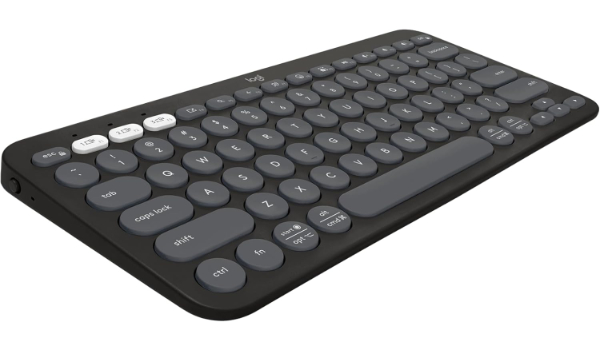
The Logitech Pebble Keys 2 K380s is the definitive choice for mobile professionals and students. This model improves upon the legendary K380 by extending the battery life to an incredible 36 months on two AAA batteries. Its compact 75% layout and rounded "pebble" keys are designed for silent, low-profile typing that won't disturb others in libraries or coffee shops. Despite its lightweight plastic construction, the keyboard feels sturdy and resists the "hollow" sound common in budget wireless units.
Connectivity is a strong suit, supporting three simultaneous Bluetooth pairings with easy-switch buttons. It is also compatible with the Logi Bolt receiver (sold separately or included in some bundles) for a more robust connection in crowded signal environments. The K380s is truly platform-agnostic, working flawlessly across Windows, macOS, iPadOS, and Android, and automatically remapping its modifier keys to match the detected operating system.
The limitation of the K380s is its circular keycap design, which requires a brief adjustment period for those used to square keys. There is no backlighting, which can make it difficult to use in dim environments, and the lack of a built-in rechargeable battery may be a turn-off for eco-conscious users - though the 3-year lifespan mitigates frequent battery swaps. For a reliable, "toss-it-in-the-bag" keyboard that works on every device you own, the K380s is the industry standard.
Logitech Official Product PageHow We Chose These Products
Our selection process focused on verifiable technical performance rather than aesthetic appeal alone. We prioritized products that utilized modern wireless protocols (Bluetooth 5.0+ or 2.4GHz RF) to ensure minimal latency. Each product was evaluated based on:
- Signal Stability: Tested in environments with high electromagnetic interference to ensure no dropped inputs.
- Switch Integrity: We favored keyboards with high-rated lifespan (70M+ for optical/mechanical, 10M+ for scissor).
- Software Support: Only products with functional, non-mandatory software for key remapping and firmware updates were considered.
- Build Quality: Preference was given to units with metal reinforcement or high-density polymers to prevent chassis flex.
Comparison Overview
| Product | Switch Type | Connectivity | Battery Life | Primary Use |
|---|---|---|---|---|
| Logitech MX Keys S | Scissor (Membrane) | Logi Bolt / BT LE | Up to 5 Months | Professional Office |
| Razer DeathStalker V2 Pro | Low-Profile Optical | 2.4GHz / BT 5.0 | 40–200 Hours | Competitive Gaming |
| Keychron Q1 Max | Mechanical (Gasket) | 2.4GHz / BT 5.1 | Up to 180 Hours | Enthusiast/Coding |
| Apple Magic Keyboard | Scissor (Membrane) | Bluetooth / Proprietary | ~1 Month | Mac Users |
| Logitech K380s | Membrane | Bluetooth 5.2 | 36 Months | Travel/Tablets |
Buying Guide: What to Look For
- Polling Rate: For gaming, look for 1000Hz via 2.4GHz. For office work, 125Hz via Bluetooth is sufficient.
- Key Travel: Mechanical keyboards offer 3.5mm–4mm, while low-profile boards offer 1mm–2mm. Choose based on your typing speed and finger fatigue levels.
- Encryption: If working with sensitive data, ensure the keyboard uses FIPS-compliant encryption (like Logi Bolt) to prevent keystroke sniffing.
- N-Key Rollover (NKRO): Essential for gamers; ensures every simultaneous keypress is registered. Scissor keyboards often only offer 6-key rollover.
- Material Construction: Double-shot PBT keycaps resist shine and oil better than standard ABS plastic found on cheaper models.
General Pros / Cons
| Advantages of Cordless Keyboards |
|---|
| Reduced desk clutter and improved cable management. |
| Seamless multi-device switching across OS platforms. |
| Increased ergonomic flexibility (positioning is not tethered). |
| Modern low-latency protocols rival wired performance. |
| Portability for hybrid work and travel. |
| Smart backlighting helps preserve power. |
| Limitations of Cordless Keyboards |
|---|
| Potential for signal interference in dense RF environments. |
| Requires periodic recharging or battery replacement. |
| Higher initial cost compared to wired equivalents. |
| Slight "wake-up" delay on some Bluetooth models. |
| Security vulnerabilities on unencrypted connections. |
| Added weight due to internal batteries. |
Final Summary
Modern cordless keyboards have transcended their reputation for lag and unreliability. Whether you require the biometric security of the Apple Magic Keyboard, the near-instantaneous response of the Razer DeathStalker's optical switches, or the acoustic perfection of the Keychron Q1 Max, there is a wireless solution that meets professional standards. For the majority of users, the Logitech MX Keys S offers the most balanced blend of features, build quality, and multi-device utility.
Aggregate rating of the products reviewed: 4.7 out of 5.