
Best Crypto Wallets for Maximum Security of 2026
In the world of digital assets, "Not your keys, not your coins" isn't just a catchy phrase--it is a technical reality. If you keep your cryptocurrency on an exchange, you are essentially asking a bank to hold your cash without a federal guarantee. Hardware wallets, or "cold storage," solve this by moving your private keys into a physical device that never touches the internet. We have researched the most robust hardware on the market to help you move your assets into a personal vault that you alone control.
Introduction
Many crypto investors fear technical complexity. Setting up a hardware wallet involves managing a 12 or 24-word "seed phrase," which acts as the master key to your entire fortune. If you lose this device, you can recover your funds with those words. If a hacker gets those words, your money is gone instantly. This guide focuses on products that make this process safer through "Secure Element" chips--specialized hardware designed specifically to resist physical tampering and digital "side-channel" attacks.
When choosing a wallet, you are balancing security against convenience. Some devices use Bluetooth to connect to your phone, which is incredibly handy for trading on the go but introduces a theoretical (though highly secured) wireless connection. Others are "air-gapped," meaning they never physically plug into a computer, using QR codes or SD cards to sign transactions. We have analyzed these tradeoffs to ensure that whether you are a "HODLer" looking to bury your savings for a decade or an active user, your private keys remain isolated from the vulnerabilities of your PC or smartphone.
Best for Mobile Use: Ledger Nano X
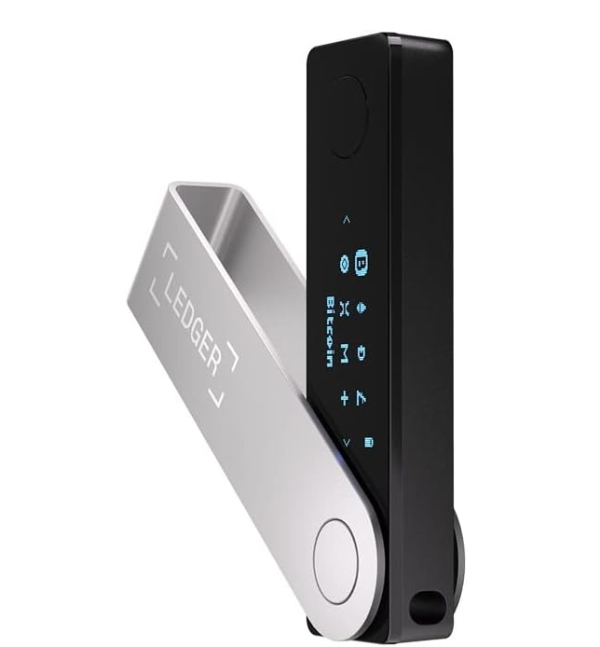
The Ledger Nano X is the most recognizable name in cold storage for a reason: it bridges the gap between high-level security and everyday usability. It features a Secure Element chip (the ST33J2M0) which is CC EAL5+ certified. This chip is virtually identical to the one used in your passport or credit card, designed to keep your private keys locked away even if the device is plugged into a computer crawling with viruses. The standout feature is its Bluetooth connectivity, allowing you to manage over 5,500 different digital assets directly from the Ledger Live mobile app without needing a laptop.
Technically, the Nano X stands out because it runs a proprietary operating system called BOLOS. Unlike many competitors that use a single "monolithic" software architecture, BOLOS isolates every app on the device. This means your Bitcoin app cannot "see" what is happening in your Ethereum app, creating an internal firewall. For the common user, this means that even if a specific coin's app has a bug, the rest of your portfolio remains untouched. It's an extra layer of digital armor that most people never see but everyone benefits from.
The honest limitation of the Ledger ecosystem is its "closed-source" firmware. While the apps are open for anyone to inspect, the core operating system is not. Some security purists find this frustrating because they have to trust Ledger's engineers that there are no "backdoors." However, for most users, the ease of use, the massive library of supported coins, and the robust physical build make this the best balance of safety and modern tech. It's best for someone who wants one device that can do everything while they are out and about.
The Common Criteria (CC) Evaluation Assurance Level (EAL) is an international standard for hardware security. EAL5+ means the chip has been tested by independent labs to resist sophisticated "penetration testing." Why It Matters: Even if a thief physically steals your Nano X and uses a laboratory-grade voltage glitching attack to try and force the chip to reveal your keys, the hardware is designed to "die" or lock up before it spills its secrets.
Best Open-Source Security: Trezor Safe 3
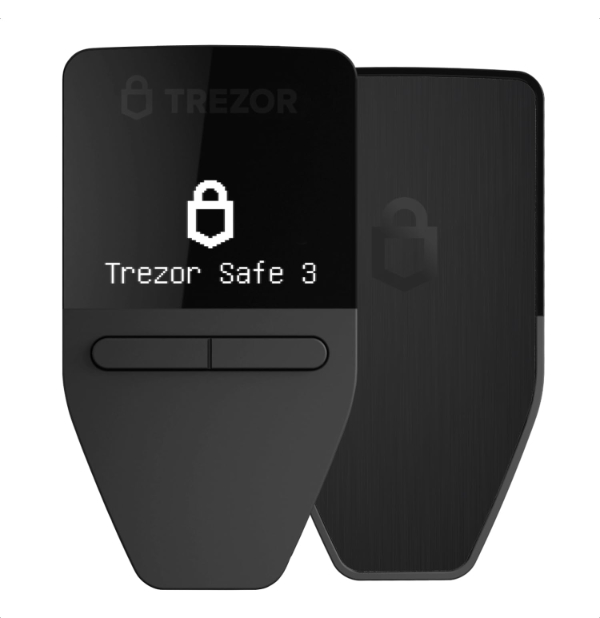
Trezor created the world's first hardware wallet, and the Safe 3 is their modern answer to the "trust" problem. For years, Trezor avoided using Secure Elements because they are typically proprietary and "closed," which goes against the open-source philosophy of crypto. With the Safe 3, they finally integrated an OPTIGA Trust M Secure Element. They did this while keeping their firmware open-source, allowing the community to verify every line of code. This "hybrid" approach offers the transparency of open software with the physical protection of a dedicated security chip.
Practically, the Trezor Safe 3 is a joy for beginners because of the Trezor Suite software. It is clean, intuitive, and helps you avoid the "friction" of complex addresses by integrating directly with exchanges for easy purchasing. It also supports "Shamirs Secret Sharing" (SLIP-0039). This is a technical way of splitting your recovery phrase into multiple parts. For example, you could have five "key shares" and require any three of them to recover your wallet. If you lose one share, or one is stolen, your funds are still safe.
The downside is that it lacks a battery and Bluetooth. You must plug it into a computer or an Android phone via USB-C to use it. This makes it slightly less convenient than the Ledger for quick trades at a coffee shop. However, if you believe that "open code is safer code" and want a device that can survive both digital hackers and physical thieves, the Trezor Safe 3 is the gold standard for transparency. It is best for the user who wants to know exactly how their security works under the hood.
Open-source means the "blueprint" of the software is public. Why It Matters: In a closed system, you have to trust the company didn't leave a "backdoor" for governments or hackers. In an open system like Trezor's, thousands of independent developers have reviewed the code to ensure it does exactly what it says and nothing more.
Best Swiss Engineering: BitBox02
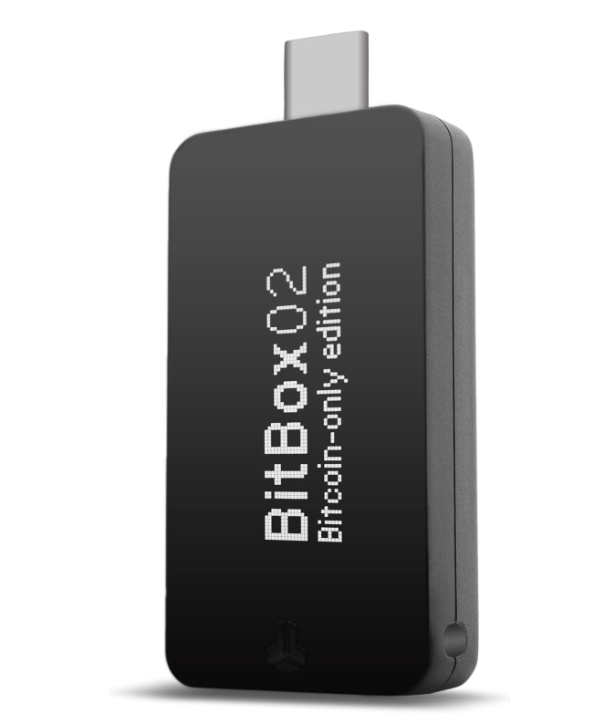
If you find the bulky screens and plastic buttons of other wallets off-putting, the BitBox02 is a revelation. Made in Switzerland, this device is about the size of a thumb drive and features a clever "touch-slide" interface. There are no physical buttons to wear out or break. It plugs directly into your laptop or Android phone via USB-C. What makes it technically superior for the "Expert Peer" is its dual-chip architecture. It uses a standard microcontroller to handle the screen and touch sensors, while an ATECC608B Secure Element handles the heavy-duty encryption.
The BitBox02 stands out because of its "minimalist attack surface." In security, the more features a device has, the more ways a hacker can try to break in. The Swiss team at Shift Crypto stripped away everything unnecessary. They even offer a "Bitcoin-only" version of the firmware. By removing the code required for thousands of other coins, they reduce the complexity of the software, making it much easier to secure and audit. This is the "surgical" approach to crypto security.
One minor friction point is the screen size--it is tiny. If you have trouble reading small text, you might struggle to verify long addresses. However, it includes a microSD card slot for instant backups. Instead of writing down 24 words on paper (which can burn or be seen by others), you can save an encrypted file to the SD card. It is best for the minimalist who values high-end European engineering and wants a device that is as discreet as it is secure.
The BitBox02 uses the Secure Element to track "monotonic counters." Why It Matters: This prevents "brute force" attacks. If someone steals your device and tries to guess your PIN, the chip remembers exactly how many attempts have been made, even if the power is cut. After a certain number of tries, the device wipes itself permanently.
Best for Advanced Privacy: Coinkite Coldcard Mk4
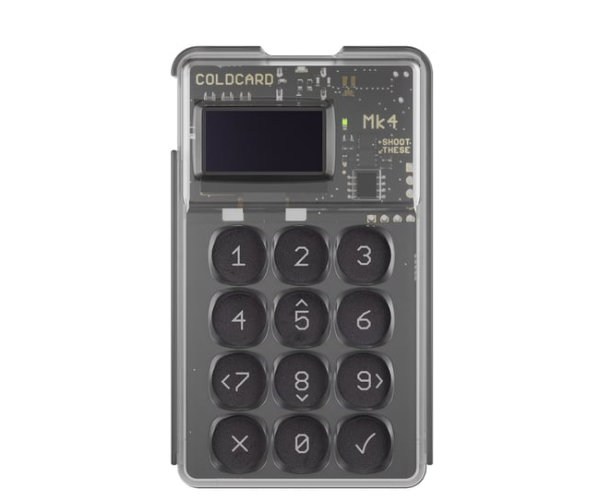
The Coldcard Mk4 is not for the faint of heart, but it is widely considered the most secure Bitcoin-only wallet ever made. It looks like a cheap 1980s calculator, but that is a deliberate "decoy" design. Underneath is a technical fortress featuring two Secure Elements from different manufacturers. This "double-blind" security means that even if a flaw is discovered in one chip (like a manufacturer backdoor), the second chip still keeps your keys safe. It is one of the few wallets that is truly air-gapped; it never has to touch a computer to sign a transaction.
Using the Coldcard involves a process called PSBT (Partially Signed Bitcoin Transactions). You prepare a transaction on your computer, save it to a microSD card, plug that card into the Coldcard to sign it, and then move the card back to the computer to broadcast it to the internet. Why it matters: This physical "sneakernet" gap means there is no electrical path for a hacker to reach your keys. Even if your PC is fully compromised, the hacker can't "travel" across the air to the Coldcard.
The friction here is the learning curve. There is no pretty "Ledger Live" app. You'll need to use third-party software like Sparrow or Electrum. It's industrial, it's nerdy, and it requires effort. However, it includes "duress" features like a secondary PIN that opens a fake wallet with a small amount of money, just in case you are ever forced to unlock it. It is best for "Power Users" who prioritize maximum paranoid-level security over everything else.
The Mk4 uses chips from Microchip and NXP. Why It Matters: By using two different brands, Coldcard eliminates "supply chain" risk. It is statistically impossible for two different multi-billion dollar companies to have the exact same unknown security flaw in two different chip architectures at the same time.
Best Air-Gapped Interface: Keystone 3 Pro
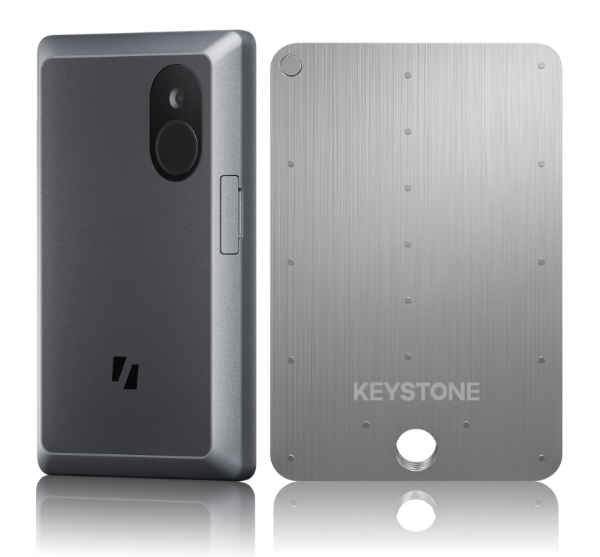
The Keystone 3 Pro takes the air-gap concept of the Coldcard but makes it modern and accessible. Instead of fumbling with microSD cards, it uses a high-definition 4-inch touchscreen and a built-in camera to transmit data via QR codes. To sign a transaction, you scan a QR code on your phone with the Keystone, verify the details on the large screen, and then scan a resulting QR code on the Keystone with your phone. It is fast, visual, and technically elegant. It eliminates all USB, Bluetooth, WiFi, and NFC connections.
Inside, the Keystone 3 Pro utilizes three separate Secure Element chips. It also features a "Self-Destruct" mechanism. If the device detects that its outer casing has been pried open, it instantly wipes all sensitive data. For the user, this means that even if a sophisticated thief steals the wallet and tries to use micro-soldering tools to extract data from the motherboard, the device will "suicide" to protect your wealth. It also features a fingerprint sensor for biometric unlocking, which is much faster than typing a long PIN every time.
The trade-off for the large screen and biometric sensors is battery life. Unlike the simple screen of a Ledger or Trezor, this device needs regular charging. It also feels more like a smartphone than a dedicated security tool, which might make some users forget it needs to be treated like a high-security vault. It is best for users who want the absolute highest level of "Air-Gap" isolation but aren't comfortable with the text-based menus of the Coldcard.
QR codes act as an "optical data bridge." Why It Matters: Unlike a USB cable, which can carry hidden malicious power surges or data packets, a QR code is strictly visual. It is physically impossible for a virus to "jump" from a laptop to the wallet via a picture, making it the safest way to sign transactions.
How We Chose These Products
Our evaluation process was centered on the "Isolation Principle." A crypto wallet is only as good as its ability to keep the private key away from the internet. We prioritized devices that use Secure Element (SE) chips over those that rely on general-purpose microcontrollers. We also looked for "Multi-Signature" compatibility, ensuring these devices can work in a setup where two or more wallets are required to authorize a spend. Finally, we analyzed the "Supply Chain Security"--how the manufacturer ensures that the device hasn't been intercepted and tampered with before it reaches your door.
Comparison Overview
| Model | Connection | Security Chip | Open Source? | Key Strength |
|---|---|---|---|---|
| Ledger Nano X | Bluetooth / USB-C | ST33 (CC EAL5+) | Apps only | Ease of Use / Mobile |
| Trezor Safe 3 | USB-C only | OPTIGA Trust M | Yes (Fully) | Transparency / Trust |
| BitBox02 | USB-C (Direct) | ATECC608B | Yes (Fully) | Swiss Engineering |
| Coldcard Mk4 | Air-Gapped / USB | Dual (Microchip/NXP) | Verifiable | Maximum Privacy |
| Keystone 3 Pro | Air-Gapped (QR) | Triple SE Chips | Open Source | Visual Air-Gap |
Buying Guide: What to Look For
- Secure Element Grade: Look for chips with a "CC EAL" rating of 5 or higher. This ensures the chip has been physically attacked in a lab and held up.
- Air-Gapping vs. Convenience: If you trade daily, a Bluetooth Ledger is safer than a hot wallet. If you are storing life-changing amounts for years, an air-gapped Coldcard or Keystone is the better choice.
- Recovery Options: Ensure the device uses BIP-39 standards. This is the industry standard for 24-word phrases. Why it matters: If the company goes out of business, you can put your words into a different brand's wallet and your money will still be there.
- Display Integrity: Always choose a wallet with an on-device screen. You must be able to verify the address on the device itself, as a computer screen can be manipulated by malware.
- Physical Tamper-Evidence: Check for features like holographic seals on the box or a "Self-Destruct" mechanism in the hardware.
General Pro / Cons
| Strengths of Cold Storage |
|---|
| Private keys never leave the physical hardware. |
| Immune to computer-based viruses and keyloggers. |
| Independent verification of transactions on-device. |
| Protection against physical theft via Secure Element. |
| Compatibility with "Multi-Sig" for ultra-high security. |
| Ownership of assets is fully decentralized. |
| Ability to recover funds if hardware is lost. |
| Resistance to remote hacking attempts. |
| Limitations of Cold Storage |
|---|
| Higher upfront cost compared to free software wallets. |
| Can be lost or physically destroyed (requires backup). |
| Slower transaction times due to physical signing steps. |
| Risk of "Seed Phrase" theft if paper backup is found. |
| Learning curve for setup and firmware updates. |
| Supply chain risks if bought from unauthorized sellers. |
| Physical buttons or screens can fail over many years. |
| Ecosystem lock-in for certain specialized tokens. |
Final Summary
Securing your cryptocurrency is a journey that starts with moving your assets off of exchanges. For most people, the Ledger Nano X offers the best mix of security and ease, especially for those who want to manage their money from a smartphone. If you are a Bitcoin purist who wants to avoid any wireless connections, the Coldcard Mk4 remains the unbeatable champion of privacy. Regardless of which you choose, remember that the device is only as secure as your 24-word recovery phrase. Treat those words like gold, and your digital assets will be safer than any bank vault could ever manage.
Aggregate rating of the products reviewed: 4.78 out of 5.