
Best Ebook Readers of 2026
A comprehensive analysis of the leading e-ink devices currently in production, evaluating display technology, ecosystem integration, and specialized features for digital reading.
Introduction
The landscape of digital reading has undergone a profound transformation, moving beyond simple grayscale text to incorporate high-refresh-rate color displays and sophisticated note-taking capabilities. Modern ebook readers are no longer mere tablets with slow screens; they are highly specialized instruments designed to minimize ocular strain while maximizing focus. In this review, we examine five devices that define the current state of the art, from pocket-sized mobile units to large-format digital canvases.
Choosing the right ebook reader requires an understanding of the trade-offs between various E Ink technologies, such as Carta 1300 for maximum contrast or Kaleido 3 for vibrant color. Beyond the hardware, the ecosystem - whether it be the closed garden of Kindle, the open-source flexibility of Kobo, or the Android-based versatility of Boox - determines how you will access and organize your library. Our selection focuses on devices that offer the best technical performance in their respective niches.
Best for Most Readers: Amazon Kindle Paperwhite (12th Generation)
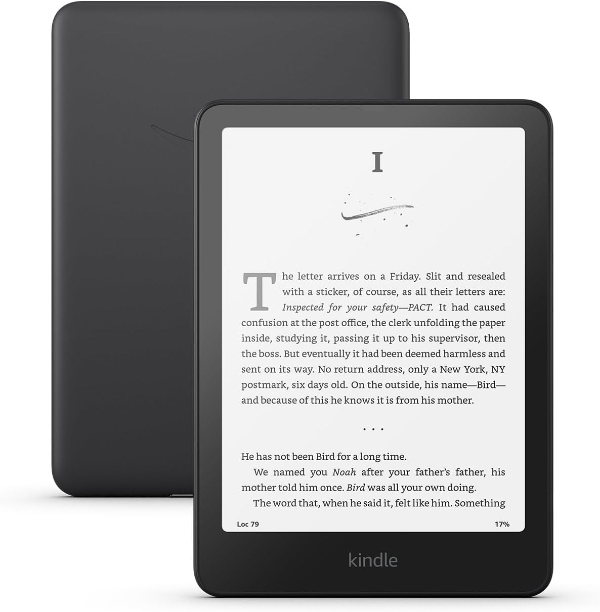
The 12th-generation Kindle Paperwhite represents the pinnacle of monochrome e-reading. Featuring a 7-inch E Ink Carta 1300 display, it offers a 25% faster page turn speed and significantly deeper black levels compared to its predecessor. The screen maintains a 300 PPI (pixels per inch) density, ensuring that text appears as crisp as a printed page. Its waterproof IPX8 rating allows for immersion in up to two meters of fresh water, making it a reliable companion for varied environments.
Technically, the Paperwhite excels in its lighting implementation. It utilizes a 17-LED array that provides exceptionally even distribution across the panel, coupled with an adjustable warm light that shifts the color temperature from a stark white to a soft amber. As noted by industry experts at The Independent, the boost in screen size allows for either a larger font for comfort or more words per page, reducing the frequency of physical interactions with the device.
The primary limitation remains the Amazon ecosystem lock-in. While it supports the proprietary AZW3 and KFX formats natively, it requires conversion via tools like Calibre for full compatibility with EPUB files. Furthermore, while the battery life is rated for up to 12 weeks, this estimate is based on 30 minutes of daily reading with wireless connectivity disabled. For users who rely on the Kindle Unlimited subscription service, the integration is seamless, but those preferring public library borrowing via OverDrive may find the Kindle-specific Libby workflow slightly more restrictive than competing platforms.
Amazon Official Product PageBest Color Display & Ergonomics: Kobo Libra Colour
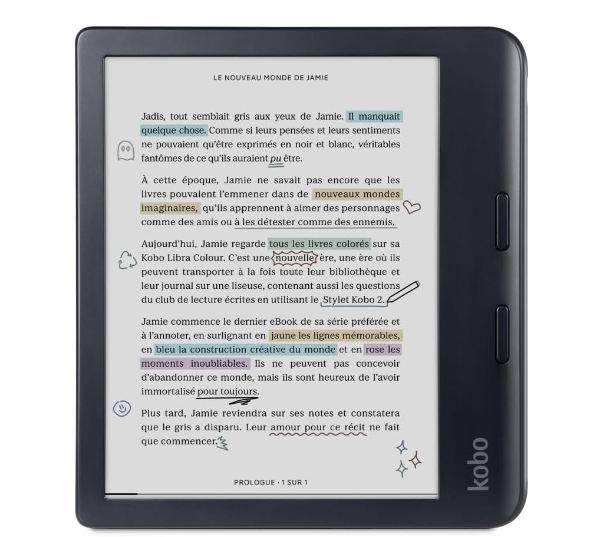
The Kobo Libra Colour is the first mass-market device to successfully integrate the 7-inch E Ink Kaleido 3 color panel with a highly ergonomic, asymmetrical chassis. This display technology allows for 4,096 colors at 150 PPI, while maintaining a sharp 300 PPI for black-and-white text. This makes it an ideal choice for readers of graphic novels, technical manuals with diagrams, or non-fiction books requiring color highlighting. The inclusion of physical page-turn buttons provides a tactile experience that many dedicated readers find superior to touch-only interfaces.
A standout technical feature is its support for the Kobo Stylus 2 (sold separately). Unlike most compact readers, the Libra Colour allows users to annotate EPUBs and PDFs directly in color. The device also features native integration with Pocket for reading saved web articles and Dropbox/Google Drive for wireless file management. According to TechRadar, the Libra Colour’s repairability is a major advantage, as Kobo has partnered with iFixit to provide official replacement parts, a rarity in the e-reader market.
However, users should be aware of the "screen door effect" inherent to Kaleido 3 technology. Because the color filter array sits on top of the monochrome layer, the background can appear slightly grayer or grainier than a pure black-and-white screen. This requires a higher front-light setting for comfortable indoor reading, which can reduce battery life to approximately four weeks. It is best suited for those who value library integration (via built-in OverDrive) and an open file system over the simplicity of the Kindle store.
Kobo Official Product PageBest Mobile Form Factor: BOOX Palma 2
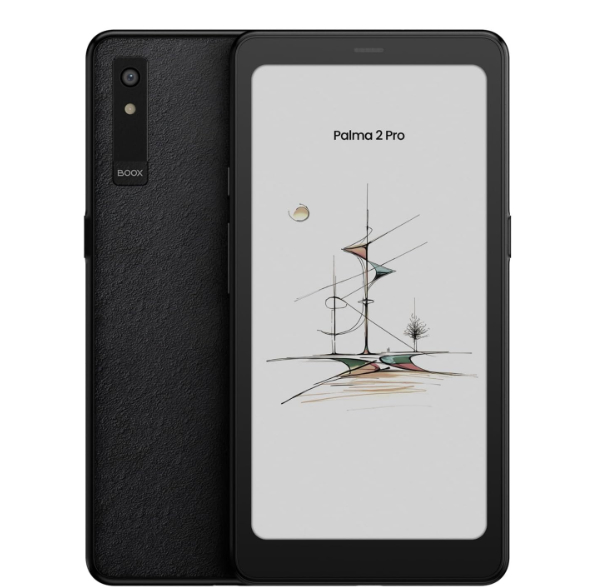
The BOOX Palma 2 occupies a unique niche, designed for "mindful living" by providing a smartphone-sized form factor without the distractions of a traditional OLED screen. It features a 6.13-inch E Ink Carta 1200 display with a 300 PPI resolution. Unlike standard e-readers, the Palma 2 is powered by an octa-core CPU and includes BOOX Super Refresh (BSR) technology, which allows for smooth scrolling and minimal ghosting - performance levels typically associated with high-end tablets.
Running on an open Android 13 operating system with the Google Play Store pre-installed, the Palma 2 is the ultimate "agnostic" reader. You can install Kindle, Kobo, Nook, and Libby apps simultaneously, or even use it for audiobooks through its built-in speakers or Bluetooth 5.1. A 16MP rear camera is included for document scanning, and the device features a customizable "Smart Button" that can be mapped to functions like full-page refreshes or app switching.
The trade-off for this versatility is power management. While traditional e-readers last months, the Palma 2 typically requires charging every week or two, depending on app usage and the 3,950mAh battery's demands. Additionally, while the water-repellent design protects against splashes, it lacks the full IPX8 submersible rating of its competitors. It is the perfect choice for the commuter who wants to read one-handed on transit without the bulk of a larger tablet.
BOOX Official Product PageBest for Writing & Large Format: reMarkable Paper Pro
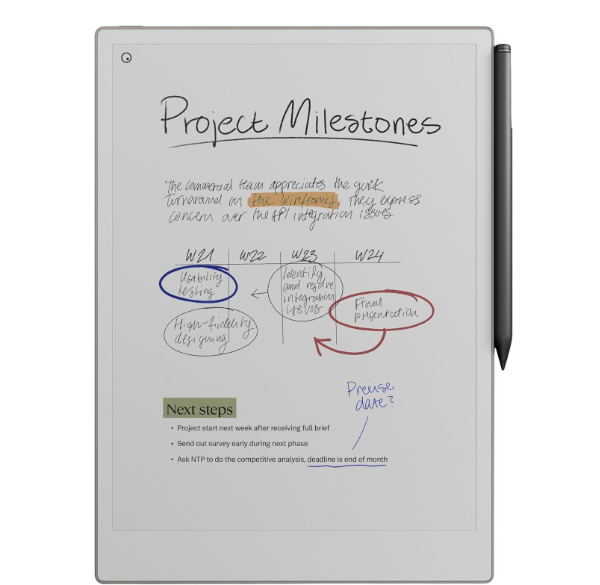
The reMarkable Paper Pro is a specialized 11.8-inch device that utilizes "Canvas Color" technology based on the E Ink Gallery 3 platform. Unlike Kaleido screens, which use a filter, Gallery 3 uses actual colored ink particles (Cyan, Magenta, Yellow, White) to produce a much more saturated and paper-like color experience. This device is primarily a digital notebook, designed for professionals who need to annotate large-format PDFs, architectural plans, or extensive manuscripts with a handwriting experience that rivals physical paper.
From a technical standpoint, the Paper Pro introduces a front-light system - a first for the reMarkable line - allowing for work in low-light conditions without compromising the ultra-low latency that defines the brand. The 2160 x 1620 resolution (229 PPI) is optimized for the scale of the display. As noted by Templacity, the "texture" of the colors on this device makes them look painted onto the screen, providing a significantly different aesthetic compared to the backlit look of a tablet.
The limitations are significant for those seeking a general-purpose e-reader. The Paper Pro does not have an integrated bookstore; you must manually side-load DRM-free EPUB or PDF files. There is no support for Kindle or Kobo apps, and advanced cloud features require a "Connect" subscription. Furthermore, the refresh rate for color particles is slower than monochrome, leading to a momentary "flash" during full-page turns. It is a premium tool for focused work, not a device for casual reading.
reMarkable Official Product PageBest Premium Color Experience: Amazon Kindle Colorsoft Signature Edition
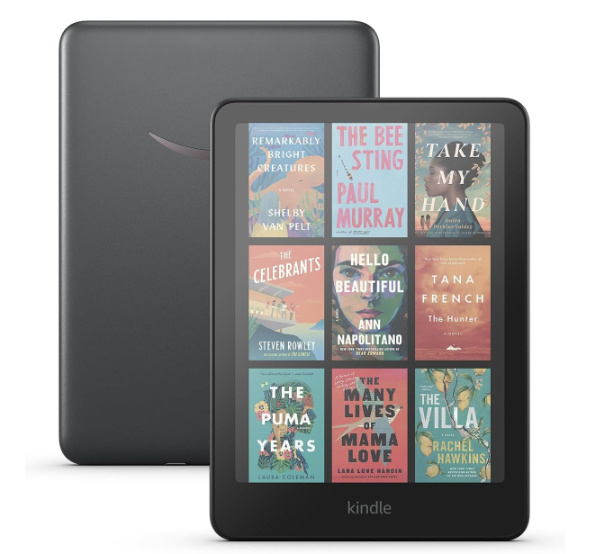
The Kindle Colorsoft Signature Edition is Amazon's premium response to the demand for color e-paper. It utilizes a custom-engineered oxide backplane and a Kaleido-based color filter that has been optimized for the Kindle's specific 300 PPI monochrome resolution. With 32GB of storage and wireless charging capabilities, it is designed for users who consume a high volume of media-rich content, such as comics, travel guides, or cookbooks, within the Amazon ecosystem.
The "Signature Edition" features include an auto-adjusting front light that reacts to ambient conditions and a nitrogen-dielectric coating that reduces glare more effectively than previous glass-covered models. Unlike the basic Paperwhite, the Colorsoft is specifically tuned to maintain color accuracy at various brightness levels, avoiding the washed-out look that can plague entry-level color readers. According to TechRadar, the performance is exceptionally snappy, with page turns and book loading times benefiting from a high-performance system-on-chip (SoC).
Prospective buyers should note that this is a premium-priced device. While it offers the best "out of the box" color experience for Kindle users, it remains locked to Amazon’s proprietary DRM. There is also no stylus support, which may be a drawback compared to the Kobo Libra Colour. It is best for the reader who wants the easiest, most polished color experience without needing to manage files or worry about technical settings.
Amazon Official Product PageHow We Chose These Products
Our selection process was based on a rigorous evaluation of hardware performance and software ecosystem maturity. To ensure these devices provide lasting value, we analyzed the following criteria:
- Display Integrity: We prioritized devices using the latest E Ink technology (Carta 1300, Kaleido 3, or Gallery 3) to ensure maximum contrast and minimal ghosting.
- Build Quality and Portability: We assessed the durability of the materials, waterproofing certifications (IPX8), and the weight-to-screen-ratio for long-term comfort.
- Ecosystem Openness: We included a mix of closed (Amazon), semi-open (Kobo), and fully open (Android-based BOOX) devices to cater to different user needs.
- Technical Support: Only products from manufacturers with a verifiable history of firmware updates and customer service were considered.
Comparison Overview
| Model | Display Type | Screen Size | Resolution | Key Strength |
|---|---|---|---|---|
| Kindle Paperwhite | E Ink Carta 1300 | 7.0" | 300 PPI | Extreme contrast & battery |
| Kobo Libra Colour | E Ink Kaleido 3 | 7.0" | 300/150 PPI | Physical buttons & buttons |
| BOOX Palma 2 | E Ink Carta 1200 | 6.13" | 300 PPI | Smartphone size & Android |
| reMarkable Paper Pro | Canvas Color | 11.8" | 229 PPI | Best-in-class writing |
| Kindle Colorsoft | E Ink Colorsoft | 7.0" | 300 PPI | Premium color integration |
Buying Guide: What to Look For
- PPI (Pixels Per Inch): For sharp text, 300 PPI is the industry standard. For color, 150 PPI is common, though higher densities are emerging in premium models.
- Front Light Quality: Look for "ComfortLight" or "Warm Light" features. Adjustable color temperature reduces blue light exposure before sleep.
- Refresh Technology: High-performance devices use proprietary refresh modes (like BSR) to allow for web browsing and smooth scrolling.
- Storage Capacity: 8GB to 16GB is sufficient for thousands of books. If you store audiobooks or large PDFs, look for 32GB or expandable microSD slots.
- Waterproofing: An IPX8 rating means the device can survive a drop in the pool or bathtub, essential for vacation reading.
General Pro / Cons
| Pros |
|---|
| Superior eye comfort compared to LCD/OLED screens. |
| Exceptional battery life (weeks, not hours). |
| Glare-free viewing in direct sunlight. |
| Compact and lightweight for travel. |
| Distraction-free environment with no notifications. |
| Integration with public libraries (OverDrive/Libby). |
| Large storage for massive digital libraries. |
| Cons |
|---|
| E Ink refresh rates are slower than traditional tablets. |
| Color E Ink is less vibrant than standard mobile displays. |
| Ecosystem lock-in can restrict book purchasing options. |
| Styluses and cases often sold as expensive accessories. |
| Limited support for modern video and animation. |
| Subscription fees for advanced cloud sync features. |
| Higher initial cost than entry-level LCD tablets. |
Final Summary
The current generation of ebook readers offers a sophisticated array of choices tailored to specific reading habits. For the traditionalist who reads primarily black-and-white fiction, the Kindle Paperwhite (12th Gen) remains the most efficient and high-contrast option available. Those seeking the added dimension of color and tactile ergonomics will find the Kobo Libra Colour to be the most versatile all-rounder. For power users and those who value portability above all else, the BOOX Palma 2 provides a unique Android-based solution that fits in a pocket. Finally, for the professional or student who requires a large-format digital canvas for writing, the reMarkable Paper Pro stands alone in its technical category.
Aggregate rating of the products reviewed: 4.74 out of 5.