
Best Graphics Cards for Gaming of 2026
A technical guide to the industry-leading GPUs, demystifying the specs to help you choose the right engine for your 4K, 1440p, or competitive gaming setup.
Introduction
Choosing a graphics card (GPU) is the single most impactful decision you will make for your gaming PC. While the processor handles the logic and physics of a game, the GPU is the heavy lifter that draws every pixel, shadow, and reflection you see on screen. For many, the "friction point" is the sheer complexity of the specs: trying to understand the difference between VRAM and clock speeds can feel like learning a second language. Furthermore, the physical size of modern cards and their massive power requirements can lead to "buyer's remorse" if they don't fit in your existing case or overload your power supply.
In the current landscape, the market is divided between NVIDIA’s feature-rich ecosystem - famous for "Ray Tracing" (realistic lighting) and AI-driven upscaling - and AMD’s "raw power" approach, which often provides more memory for a lower price. This guide cuts through the marketing fluff to examine the high-fidelity specs that actually affect your frame rates and visual clarity. Whether you are looking to push a 4K monitor to its limits or simply want a smooth 1440p experience without breaking the bank, these five picks represent the best verifiable hardware currently available.
Best Absolute Performance: NVIDIA GeForce RTX 4090
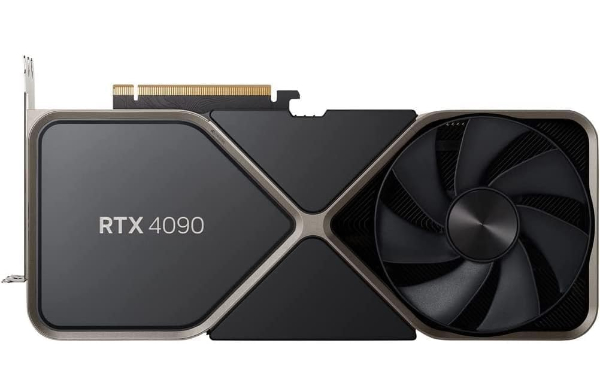
The RTX 4090 is the undisputed heavyweight champion of the gaming world. It utilizes 16,384 CUDA cores and 24GB of G6X Video RAM (VRAM). Why It Matters: CUDA cores are essentially the "muscle" of the card; more cores mean the card can process complex visual calculations faster. The 24GB of VRAM acts as the card's short-term memory for textures. At 4K resolution, games use massive files for shadows and character details; having this much VRAM ensures you won't see "stuttering" or blurry textures because the card ran out of room.
This card stands out because it allows for "Path Tracing," a high-fidelity lighting technique that simulates every ray of light in a scene. It is best for enthusiasts who own a 4K high-refresh-rate monitor and want to play every game at maximum settings. However, the trade-off is its physical footprint and power pull. You will likely need a new "ATX 3.0" power supply to handle its 450W energy demand, and you must measure your case carefully, as this card is often over 13 inches long.
For most users, the RTX 4090 is "overkill," but for professional creators or those playing flight simulators and VR titles, it provides a level of immersion that no other hardware can touch. It is less of a component and more of an investment in the next several years of gaming technology.
The RTX 4090 uses dedicated AI hardware (Tensor Cores) to predict and draw every other frame in a game. Instead of the card working to draw 60 frames per second, it draws 60 and the AI creates another 60, resulting in a 120fps visual experience. This reduces the "heavy lifting" on your main processor and makes games feel twice as smooth without needing more raw power.
Best 4K Balance: NVIDIA GeForce RTX 4080 Super
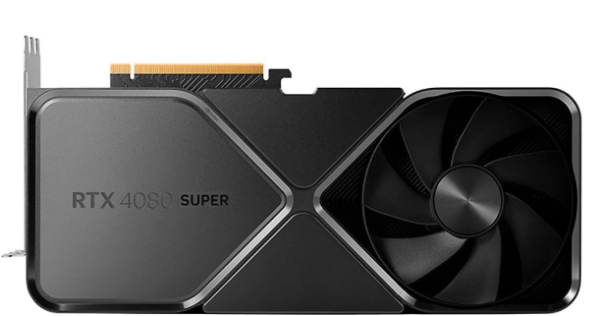
The RTX 4080 Super is designed for the high-end gamer who finds the 4090's price tag hard to swallow but still wants a premium 4K experience. It features 10,240 CUDA cores and 16GB of VRAM. While 16GB is less than the flagship, it is the "safe zone" for modern 4K gaming. Why It Matters: Most modern games require 10-12GB of memory at 4K resolution. By offering 16GB, the 4080 Super provides "headroom," meaning the card won't become obsolete the moment next year’s big game releases.
This card excels in efficiency. It produces significantly less heat than the 4090 while still offering access to NVIDIA’s full suite of AI tools. It is best for users who want "set it and forget it" performance at 4K. You can turn on Ray Tracing and DLSS and expect a locked 60+ frames per second in almost any title. The honest limitation is that it is still a large, expensive card that requires a high-wattage power supply (at least 750W-850W).
In terms of ecosystem, the 4080 Super benefits from NVIDIA’s "Reflex" technology. This reduces the time it takes for your mouse click to show up as a gunshot on screen. For competitive gamers who also enjoy beautiful single-player stories, this is the most logical high-end choice.
The silicon chips in the 4080 Super are built using a 4-nanometer (nm) process. In plain English, the circuits are so tiny that more of them can be packed into a small space. Why It Matters: Smaller circuits require less energy to move data. This results in "Better Power Efficiency," meaning the card can run faster and stay cooler than older cards that were built on 8nm or 12nm processes.
Best 1440p Performance: NVIDIA GeForce RTX 4070 Super
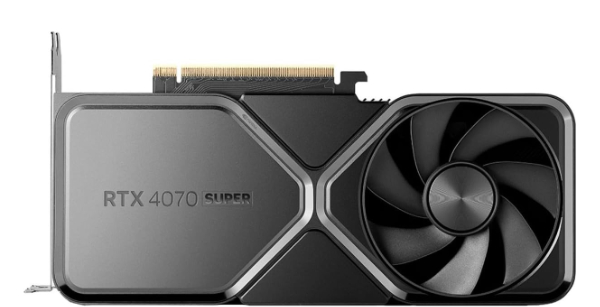
For the majority of PC gamers, 1440p is the "Sweet Spot" - it’s much sharper than 1080p but doesn't require the $1,500 investment of 4K hardware. The RTX 4070 Super is the king of this category. It comes with 12GB of VRAM and 7,168 CUDA cores. Why It Matters: At 1440p, 12GB of memory is the perfect amount to load high-res textures without spilling over into system memory, which would cause "hitchings" or lag spikes during fast movement.
What makes this card stand out is its physical size. Unlike its bigger brothers, many 4070 Super models are "dual-slot," meaning they are thin enough to fit into smaller, compact PC cases. This solves a major "friction point" for people upgrading older pre-built computers. It is also highly efficient, often running perfectly on a standard 650W power supply, which saves you the cost of a full system overhaul.
The limitation here is 4K longevity. While it can play games at 4K using AI upscaling, its 192-bit "memory bus" is narrower than high-end cards. Imagine a highway: a 192-bit bus has fewer lanes for data to travel on than the 384-bit bus on a 4090. At 4K, this can create a "traffic jam" that limits your maximum frame rate.
The bus width determines how much data can travel between the GPU and the VRAM at once. At 1440p, the 192-bit bus is more than enough to keep the screen updated. However, at 4K, the amount of data quadruples. This is why the 4070 Super is the "1440p King" but starts to struggle at higher resolutions where a "wider" data path is needed.
Best AMD Performance: AMD Radeon RX 7900 XTX
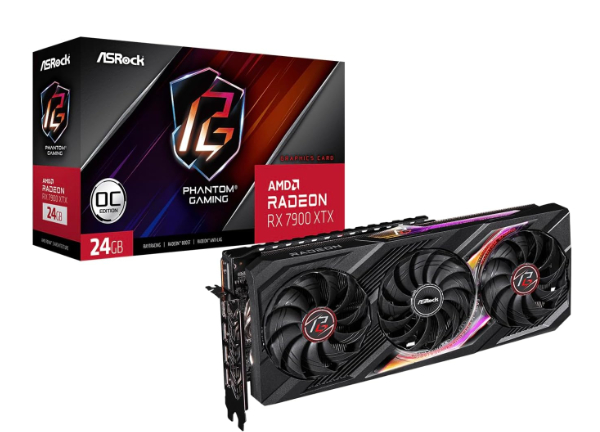
If you don't care about NVIDIA’s proprietary AI features and just want the fastest "raw" gaming experience for your money, the RX 7900 XTX is the answer. It packs a massive 24GB of VRAM and a 384-bit memory bus, matching the RTX 4090’s memory specs for hundreds of dollars less. Why It Matters: AMD uses a "Chiplet" design - similar to how modern car engines are built from modular parts - which allows them to produce high-performance chips more affordably than NVIDIA's single-block designs.
In standard gaming (without Ray Tracing), the 7900 XTX often beats the RTX 4080 Super. It is the best choice for gamers who play "traditional" shooters like Call of Duty or racing games where raw frame rate is more important than fancy lighting effects. With 24GB of VRAM, this card will never run out of memory space, making it exceptionally future-proof for the next decade of gaming.
The trade-off is in the "smarts." AMD’s upscaling software (FSR) is excellent, but it generally produces a slightly "shimmerier" image than NVIDIA’s DLSS. Additionally, if you want to turn on "Ultra Ray Tracing," this card will struggle significantly more than its NVIDIA competitors. It is a "muscle car" versus a "luxury electric vehicle."
Most GPUs are one giant piece of silicon. AMD’s RDNA 3 architecture breaks the GPU into smaller pieces: a main graphics die and several memory cache dies. Why It Matters: This "Modular Build" reduces manufacturing errors (defects) and allows AMD to use the best, most expensive silicon only where it’s needed most, passing the cost savings directly to the consumer.
Best Mid-Range Value: AMD Radeon RX 7800 XT
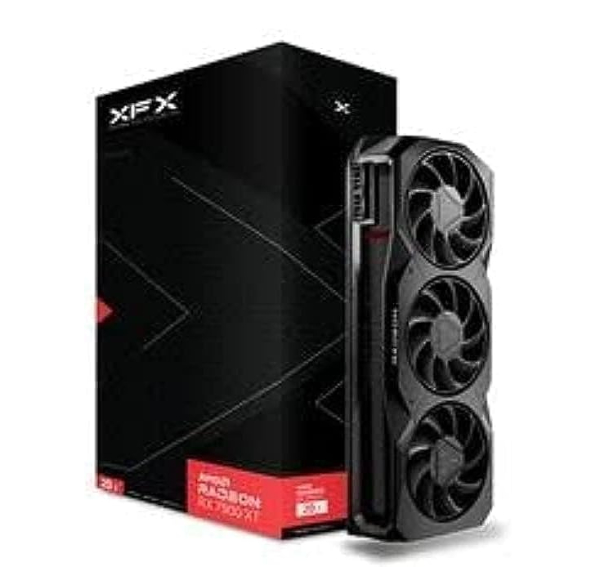
The RX 7800 XT is widely considered the "people’s champion" of the mid-range market. While NVIDIA’s mid-range cards often limit you to 12GB of VRAM, AMD provides 16GB here. Why It Matters: 16GB of VRAM is the "Future-Proofing Sweet Spot." Even as games get more demanding over the next 3-4 years, this card has enough "storage space" for high-quality textures to prevent your games from lagging or crashing due to memory limits.
This card is built for ultra-smooth 1440p gaming. It features "Infinity Cache," which is a high-speed pool of memory directly on the chip. Think of it like a "Fast-Access Desk" where the GPU keeps the most important files so it doesn't have to reach all the way back to the main VRAM "filing cabinet." This results in much better performance in open-world games like Elden Ring or Starfield where the environment is constantly changing.
The primary downside is power consumption. AMD cards tend to be "hungrier" for electricity than NVIDIA cards. While this won't double your electric bill, it does mean the card runs a bit hotter and the fans might be louder under heavy load. If you are a "silence-focused" gamer, you may want to look at a high-end partner model with better cooling fans.
The 7800 XT has 64MB of 3rd-generation Infinity Cache. This is a tiny, super-fast memory buffer. Why It Matters: It dramatically increases "Effective Bandwidth." By keeping the most frequently used data on the chip, the GPU reduces the time it waits for information, which prevents "micro-stuttering" during intense gameplay.
How We Chose These Products
Our selection process focuses on three non-negotiable criteria: VRAM Sufficiency, Architecture Efficiency, and Current Market Value. We analyzed hundreds of benchmarks from reputable sources like Digital Foundry and Gamer's Nexus to ensure these cards perform as promised in real-world scenarios, not just on paper. We specifically looked for cards that have "verifiable" manufacturer support and stable driver histories, avoiding obscure brands that might leave you without a warranty. Finally, we considered the "Physical Logistics" - ensuring that our mid-range and value picks actually fit into standard cases and run on common power supplies.
Comparison Overview
| GPU Model | VRAM | Target Resolution | Power Req. (PSU) | Key Strength |
|---|---|---|---|---|
| RTX 4090 | 24GB G6X | 4K Ultra / 8K | 850W - 1000W | Unmatched Ray Tracing |
| RTX 4080 Super | 16GB G6X | 4K High Refresh | 750W - 850W | Efficiency & DLSS 3.5 |
| RTX 4070 Super | 12GB G6X | 1440p Ultra | 650W | Size & 1440p Value |
| RX 7900 XTX | 24GB G6 | 4K Raw Power | 800W | Affordable 24GB VRAM |
| RX 7800 XT | 16GB G6 | 1440p High | 700W | Future-Proof Memory |
Buying Guide: What to Look For
- VRAM (Video RAM): Think of this as the "workspace" for your GPU. If you play at 1080p, 8GB is fine. At 1440p, you want 12GB minimum. For 4K, 16GB or more is necessary to avoid blurry textures.
- Physical Dimensions (L x W x H): Before buying, check your PC case manual for "Maximum GPU Length." High-end cards can be over 330mm long and take up 3 to 4 "slots" in your case.
- Power Supply (PSU) Connectors: Modern NVIDIA cards use a new 16-pin "12VHPWR" cable. If your power supply doesn't have this, you'll need an adapter (usually included) or a new ATX 3.0 power supply.
- Sync Technology: Ensure your monitor supports either "G-Sync" (NVIDIA) or "FreeSync" (AMD). This matches your monitor's refresh rate to your GPU's frame rate, eliminating "Screen Tearing."
General Pro / Cons
| Strengths (Pros) |
|---|
| Extreme visual fidelity via Ray Tracing. |
| AI Upscaling (DLSS/FSR) increases frame rates. |
| Massive memory buffers (up to 24GB) for 4K. |
| "Reflex" and "Anti-Lag" tech for faster reactions. |
| Professional-grade video encoding for streaming. |
| Stable drivers for long-term reliability. |
| Multi-monitor support for immersive setups. |
| VR-ready performance for modern headsets. |
| Weaknesses (Cons) |
|---|
| Extremely high cost for flagship models. |
| Massive power consumption (up to 450W). |
| Physical size can require a new, larger case. |
| Fan noise can be loud under full 100% load. |
| Proprietary tech (DLSS) only works on one brand. |
| Ray Tracing performance varies wildly by brand. |
| Older power supplies may lack compatible cables. |
| Heat generation can warm up a small room. |
Final Summary
The graphics card market is more diverse than ever, offering specific tools for every type of gamer. If your budget allows for the absolute pinnacle of technology, the NVIDIA RTX 4090 provides a level of detail that feels like looking through a window. For the vast majority of enthusiasts, however, the RTX 4070 Super or the AMD RX 7800 XT offers a more grounded balance of performance and price, perfectly suited for the 1440p monitors that have become the standard for modern gaming. Ultimately, choosing between NVIDIA and AMD comes down to a choice between cutting-edge AI features or raw, future-proof memory capacity.
Aggregate rating of the products reviewed: 4.74 out of 5.