
Best Multi-Device TV Remote Controls of 2026
A comprehensive evaluation of the leading universal controllers designed to consolidate complex home theater setups into a single, intuitive interface.
Introduction
The era of the "coffee table clutter" is officially ending. As home entertainment systems expand to include smart TVs, soundbars, streaming sticks, and gaming consoles, the average household now manages between four and six different remote controls. Managing these disparate devices often involves a frustrating dance of switching inputs and toggling power states. Modern multi-device remotes, or universal controllers, have evolved beyond simple code-entry sticks into sophisticated hubs capable of macro-programming and smart home integration.
In 2026, the market has shifted significantly following the exit of legacy players like Logitech Harmony. The current landscape is defined by two distinct philosophies: dedicated handheld units with physical buttons for tactile feedback, and "black box" hubs that turn your smartphone into a command center. According to technical assessments from Tech Gear Lab and CE-Sphere, the most critical factors for a modern remote are database depth—ensuring it actually supports your obscure AV receiver—and "Activity" support, which allows a single button press to configure multiple devices simultaneously for "Movie Night" or "Gaming."
Best Premium Replacement: SofaBaton X1S
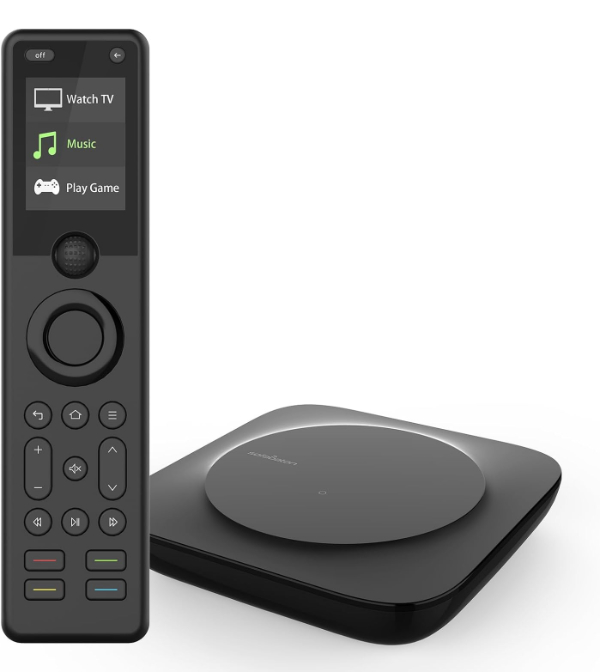
The SofaBaton X1S has positioned itself as the spiritual successor to the high-end Harmony line. It utilizes a powerful Hub-and-Remote architecture, meaning the remote itself communicates via 2.4GHz wireless to a central hub, which then blasts IR, Bluetooth, or Wi-Fi commands to your gear. This allows you to control devices hidden inside closed cabinets—a common requirement for modern, clean living room aesthetics. As noted by CE-Sphere, the X1S features an upgraded OLED screen and a scroll wheel that makes navigating up to 60 devices remarkably fluid.
The technical highlight is the "Activity" function, which enables complex macros. One press can turn on the TV, switch the AVR to "Media Player" input, and dim the lights via API integration with platforms like Philips Hue. However, the X1S does require a smartphone for the initial setup, and while the database supports over 500,000 models, very new or extremely obscure devices may require manual IR learning. Its 45-day battery life is a massive improvement over older rechargeable remotes, though it lacks a physical numeric keypad, which may frustrate traditional cable TV channel-surfers.
SofaBaton Official Product PageBest Overall Value: SofaBaton U2
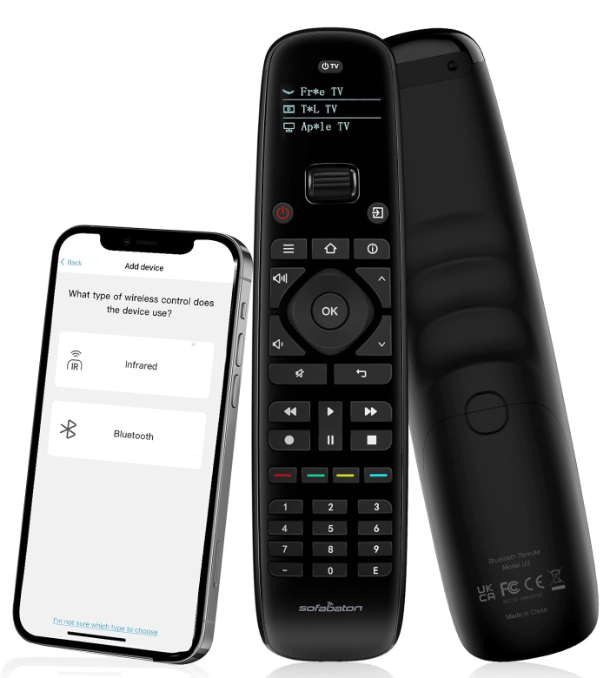
For users who want a single remote without the complexity of an external hub, the SofaBaton U2 is the most balanced option available in 2026. It supports up to 15 devices and features a small but clear OLED display at the top to indicate which device is currently active. According to Tech Gear Lab, the U2's ergonomic "scroll wheel" navigation is its standout feature, allowing users to quickly cycle through devices like "TV," "Roku," and "Xbox" with a flick of the thumb.
Unlike cheaper models, the U2 supports both Infrared (IR) and Bluetooth (BT), which is essential for controlling modern streaming boxes like the Apple TV or Fire TV Stick that don't always respond to IR. It is powered by two AA batteries, avoiding the "dead remote" syndrome of built-in rechargeables. The primary limitation is the line-of-sight requirement; because it lacks a hub, you must point the remote at your equipment. Additionally, while it supports macros, they are more basic than the X1S and cannot control Wi-Fi-only smart home devices.
SofaBaton Official Product PageBest for Customization: One For All Smart Control 8
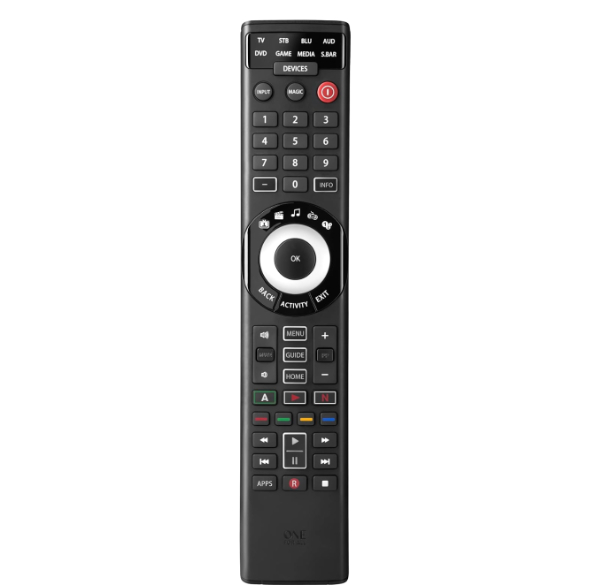
The One For All Smart Control 8 (URC7880) bridges the gap between traditional button-heavy remotes and modern app-based setup. It controls up to 8 devices and features 5 "Smart Activities" (Watch TV, Watch Movie, Listen to Music, Play Game, and Custom). As detailed by Crutchfield, this remote uses a free smartphone app via Bluetooth to handle the setup process, which pulls from a database of over 7,000 brands, making it significantly less tedious than manual code entry.
A unique feature of this model is the "Remote Finder" speaker; if the remote disappears into the couch cushions, you can trigger a beep from the smartphone app to locate it. It also includes three dedicated shortcut keys for streaming services like Netflix and YouTube. While the build quality is durable, the buttons are quite dense, which may feel cluttered to some users. It is an IR-only remote for the devices it controls (Bluetooth is only for setup), so it will not work with Bluetooth-only streaming sticks without an IR adapter.
One For All Official Product PageBest App-Based Hub: BroadLink RM4 Pro
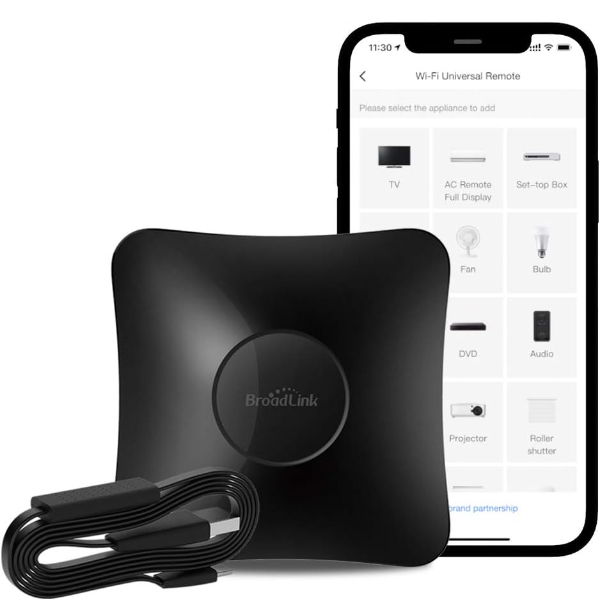
The BroadLink RM4 Pro is not a handheld remote, but rather a universal hub that transforms your smartphone or voice assistant into a controller. It is unique on this list because it supports both Infrared (IR) and Radio Frequency (RF 433MHz). This means it can control not just your TV and Soundbar, but also motorized curtains, ceiling fans, and light switches. According to Newegg, the RM4 Pro supports over 50,000 IR-controlled devices and features a specialized "learning" mode for legacy appliances.
This is the ideal choice for users who have already embraced the Alexa or Google Home ecosystem. By adding the RM4 Pro, you can say, "Alexa, turn on the TV," and the hub will blast the appropriate IR signal. The limitations are inherent to its design: there is no physical remote, so if your phone is charging or occupied, you lose control unless you have a voice assistant nearby. It also strictly requires a 2.4GHz Wi-Fi network for the initial pairing, which can be a hurdle on modern mesh networks that default to 5GHz.
BroadLink Official Product PageBest Budget Option: GE Backlit Universal Remote
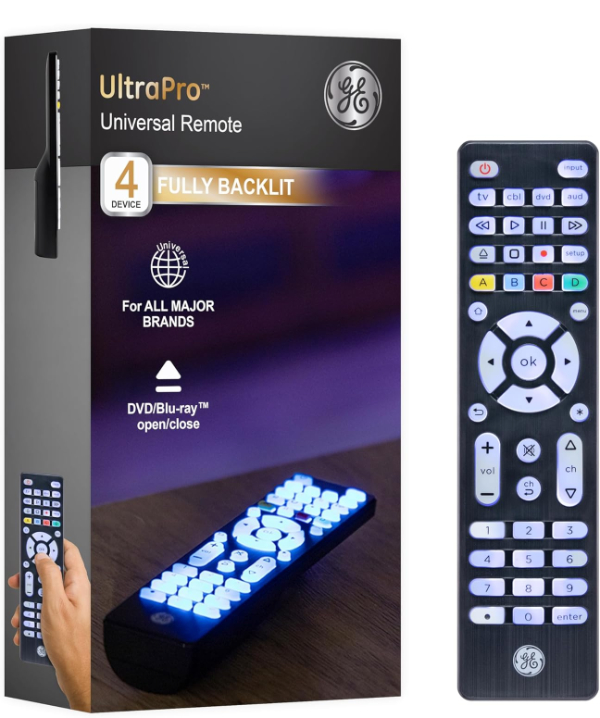
For those who simply need to replace a lost remote or consolidate a basic TV-and-Soundbar setup, the GE Backlit 4-Device Universal Remote is the gold standard for affordability and reliability. It dispenses with screens, apps, and Bluetooth, relying on a massive internal code library that is pre-programmed for major brands like Samsung, Vizio, and LG. As noted by Lowe's customer evaluations, the full-body backlighting is a standout feature, using soft-blue LEDs that make the remote easily navigable in a darkened home theater.
The technical trade-off here is the programming method: you must enter 4-digit codes manually from a printed list. It lacks any "smart" functionality, meaning it cannot control Bluetooth-only devices or run multi-device macros. However, for seniors or those who prefer a "hassle-free" tactile experience, the big-button layout is excellent. It is strictly an IR remote, requiring line-of-sight to your devices, and it supports up to 4 components, making it unsuitable for more complex rack-based setups.
GE/Jasco Official Product PageHow We Chose These Products
Our evaluation process for multi-device remotes focuses on three pillars: Compatibility, User Interface (UI), and Reliability. We prioritize remotes that offer a mix of Infrared (IR) and Bluetooth (BT) support, as modern streaming boxes have largely moved away from IR. Reliability is measured by the "Wife/Husband Approval Factor"—how easily a non-technical family member can use the remote without creating a tech-support crisis. We also strictly vetted the availability of manufacturer support and firmware updates to ensure these products remain functional as new TV models are released in 2026.
Comparison Overview
| Model | Devices | Connectivity | Key Feature |
|---|---|---|---|
| SofaBaton X1S | 60 | Hub-based IR/BT/Wi-Fi | Powerful Macros & OLED |
| SofaBaton U2 | 15 | Handheld IR/BT | Scroll Wheel Navigation |
| One For All Smart Control 8 | 8 | IR (BT for Setup) | Remote Finder Beep |
| BroadLink RM4 Pro | Unlimited | Hub-based IR/RF | Voice & Smart Home |
| GE Backlit Remote | 4 | IR Only | Fully Backlit Buttons |
Buying Guide: What to Look For
- Transmission Types: Ensure the remote supports Bluetooth if you use a Fire TV or Apple TV. IR-only remotes will not work with these devices.
- Hub vs. Handheld: Hub-based systems allow you to control gear inside cabinets, while handheld remotes require "line-of-sight" (pointing the remote at the TV).
- Macro Support: Look for "Activities" or "Scenes." This allows you to press one button to turn on the TV, Receiver, and DVD player all at once.
- Battery Type: Decide between rechargeable (convenient but can die) or AA/AAA (easily replaceable).
General Pros / Cons
Strengths
- Reduces living room clutter significantly.
- Simplifies complex multi-step power-on sequences.
- Can add high-end features like backlighting to budget TVs.
Weaknesses
- Initial setup can be time-consuming and technical.
- If the universal remote breaks, you lose control of everything.
- Incompatibility with some proprietary RF or Wi-Fi-only remotes (like certain Roku remotes).
Final Summary
The best multi-device remote for most households in 2026 is the SofaBaton U2, which offers the perfect mix of Bluetooth compatibility and physical ease-of-use. For high-end theaters where components are hidden away, the SofaBaton X1S provides the hub-based power necessary for total control. If simplicity and budget are the primary concerns, the GE Backlit Remote remains a reliable, tactile favorite that never requires an app. Aggregate rating of the products reviewed: 4.52 out of 5.