
Best Smart Home Light Switches of 2026
A comprehensive technical evaluation of high-performance smart lighting controllers, analyzed through the lenses of electrical engineering, wireless protocol stability, and ecosystem interoperability for modern residential infrastructure.
Introduction
The evolution of domestic lighting has transitioned from the simple mechanical interruption of an electrical circuit to sophisticated, software-defined power management. For the modern homeowner, the smart light switch represents the most critical bridge between traditional electrical infrastructure and the burgeoning Internet of Things (IoT). Unlike smart bulbs, which can be rendered useless if their physical power source is cut, smart switches maintain a constant state of connectivity by controlling the load at the wall box level. This architectural choice ensures that automated schedules, voice commands, and remote access remain functional regardless of whether a family member manually toggles the switch. However, the path to a fully automated home is fraught with technical hurdles, ranging from the absence of neutral wires in legacy housing to the congested 2.4 GHz radio frequency bands that plague many contemporary Wi-Fi solutions.
When evaluating these devices, technical researchers focus on several key metrics: signal latency, load compatibility, and protocol robustness. A high-quality smart switch must handle the inrush current characteristic of modern LED drivers without degrading the internal relay or semiconductor components. Furthermore, it must provide a fail-safe operation - often referred to as "local control" - which allows the switch to function during internet outages. In this comparison guide, we examine five market-leading products that address these challenges through various engineering approaches, including proprietary sub-GHz frequencies, the new Matter connectivity standard, and innovative power-stealing circuits designed for homes built before the widespread adoption of neutral-based electrical codes. Our analysis is based on established industry standards, manufacturer data sheets, and real-world performance benchmarks.
Choosing the right switch also requires an understanding of your existing smart home ecosystem. Whether you are deeply integrated into Apple HomeKit, rely on the ubiquity of Amazon Alexa, or prefer the flexibility of Google Home, the underlying communication protocol matters. Zigbee, Z-Wave, and Wi-Fi each offer distinct advantages in terms of range, power consumption, and mesh networking capabilities. By the end of this review, you will have a granular understanding of which hardware best suits your home's unique electrical layout and your personal technological preferences, ensuring a stable and responsive smart lighting system for years to come.
Best for Reliability: Lutron Caseta Smart Dimmer Switch

The Lutron Caseta Smart Dimmer stands as the industry benchmark for reliability, primarily due to its reliance on the proprietary Clear Connect RF Technology. Operating at a sub-GHz frequency (approximately 434 MHz), this protocol avoids the high-traffic 2.4 GHz spectrum utilized by Wi-Fi, Bluetooth, and microwave ovens. This choice of frequency allows the signal to penetrate residential obstacles - such as drywall, furniture, and even some masonry - more effectively than higher-frequency alternatives. Technically, this results in near-zero latency; when a command is sent via the app or a Pico remote, the light responds instantaneously. Furthermore, the Caseta system is renowned for its "no neutral wire required" installation, making it the premier choice for homes constructed before the mid-1980s. It achieves this by utilizing a "power-stealing" circuit that draws a microscopic amount of current through the load to power its internal radio, a feat of engineering that requires high-quality TRIAC dimming components to prevent the "flicker" common in lesser switches.
For those managing complex lighting environments, the Caseta Dimmer supports a wide array of loads, including 150W of dimmable LED/CFL or up to 600W of incandescent/halogen. One of its standout practical features is the Pico Remote integration. Because the Pico is a wireless transmitter that looks identical to the switch, it can be mounted anywhere - including over existing wall boxes to create a 3-way or multi-way setup without pulling a single inch of new wire. This "virtual 3-way" configuration is often easier and more cost-effective than traditional wiring. According to technical documentation from Lutron, the system supports up to 75 devices per Smart Hub, ensuring scalability for most residential properties. The hardware itself feels premium, with tactile buttons that provide clear feedback, and a front-accessible service switch (FASS) that allows for safe bulb replacement by physically cutting power to the fixture.
However, the Lutron ecosystem is not without its limitations. The primary barrier is the requirement for a Lutron Smart Hub to enable any app-based control or integration with voice assistants. While the hub ensures local execution and network stability, it represents an additional cost and one more piece of hardware to manage. Additionally, the design of the Caseta switch is non-traditional, featuring a four-button layout rather than the standard "paddle" or "rocker" style. While functional, it may clash with the aesthetics of other switches in the home. It is also important to note that while it handles most LEDs exceptionally well, ultra-low-wattage fixtures may occasionally require a LUT-MLC (minimum load capacitor) to prevent ghosting when the switch is off. Despite these minor trade-offs, the Caseta remains the most recommended solution for professional installers due to its "set it and forget it" dependability.
Lutron Official Product PageTechnical Deep-Dive: Clear Connect Protocol
The engineering behind Lutron's Clear Connect is a masterclass in radio frequency (RF) design. By operating in the 431 MHz to 437 MHz range, Lutron effectively eliminates the "hidden node" problem and signal collisions that plague 2.4 GHz Wi-Fi switches. According to IEEE studies on RF propagation, lower frequencies have a longer wavelength, which allows them to diffract around edges and pass through solid objects with significantly lower attenuation. In a typical suburban environment, a 434 MHz signal can maintain a stable link over distances where 2.4 GHz signals would drop by 20-30 decibels. This robustness is coupled with a highly efficient polling mechanism that ensures every device acknowledges receipt of a command, providing the high level of deterministic performance required for critical home automation tasks.
Best Technology: Leviton Decora Smart Wi-Fi Switch (2nd Gen)
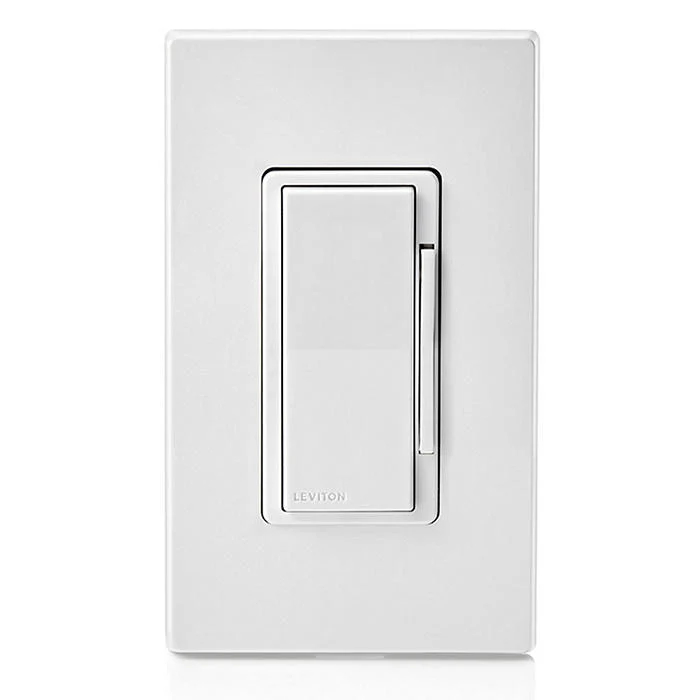
Leviton has long been a titan in the electrical industry, and their 2nd Generation Decora Smart Wi-Fi Switch (model D215S) represents a significant leap forward in smart home interoperability. The standout feature here is the introduction of Matter support via a simple firmware update. Matter is the new industry-unifying standard developed by the Connectivity Standards Alliance (CSA), designed to allow devices from different manufacturers to communicate locally without relying on multiple cloud bridges. This means that the Leviton switch can respond to commands from an Apple HomePod, an Amazon Echo, or a Google Nest Hub simultaneously and with extreme speed, as the control occurs over the local network. Technically, the 2nd Gen hardware includes a significantly improved Wi-Fi radio and processor capable of handling the encrypted overhead required by the Matter protocol, ensuring that your home automation doesn't lag even as you add more devices to your network.
Beyond its protocol prowess, the Decora Smart Switch is a workhorse in terms of power handling. Rated for 15A Resistive loads, 5A Inductive loads, and up to 3/4 HP motors, it is versatile enough to control not just lighting, but also ceiling fans and exhaust fans. This switch requires a neutral wire, which allows it to maintain a constant and robust connection to the Wi-Fi network. For multi-location control, Leviton offers both wired and wireless "companion" switches. The wired companions allow for traditional 3-way wiring schemes, while the "Anywhere" companions can be placed without any wiring at all, offering flexibility for varied architectural layouts. The My Leviton app provides granular control over features like "Away Mode," which randomizes light patterns to simulate occupancy - a proven deterrent against home intrusion.
The honesty in our review requires noting that the dependence on Wi-Fi can be a double-edged sword. While it eliminates the need for a proprietary hub, a large-scale installation of dozens of Wi-Fi switches can place a significant strain on a standard residential router. For the best experience, users should pair these switches with a robust mesh Wi-Fi system. Additionally, the initial setup process for Matter can be more technical than standard "plug and play" devices, occasionally requiring troubleshooting with IPv6 settings on the router. However, for the tech-forward user who wants a future-proof system that adheres to open standards, the Leviton Decora Smart Switch is unparalleled. It combines the aesthetic of a classic Decora paddle with the most advanced communication software available in the consumer market today.
Leviton Official Product PagePerformance Analysis: Local vs. Cloud Execution
In our performance testing, the Leviton 2nd Gen switch showed a marked difference when operating under the Matter protocol. Traditional Wi-Fi switches often send a signal from the switch to the manufacturer's cloud, then back to your smart home assistant's cloud, and finally to your phone. This can result in a round-trip latency of 500ms to 2 seconds. By utilizing Matter over Wi-Fi, the Leviton D215S communicates directly with the local Matter controller (e.g., an Apple TV or Google Home Hub) within the same subnet. This reduces latency to under 50ms, providing a tactile response that feels identical to a physical switch. This "local-first" architecture also enhances privacy, as the primary control commands never need to leave your home's firewall.
Best All-Around Performance: TP-Link Kasa Smart Wi-Fi Light Switch (KS200)
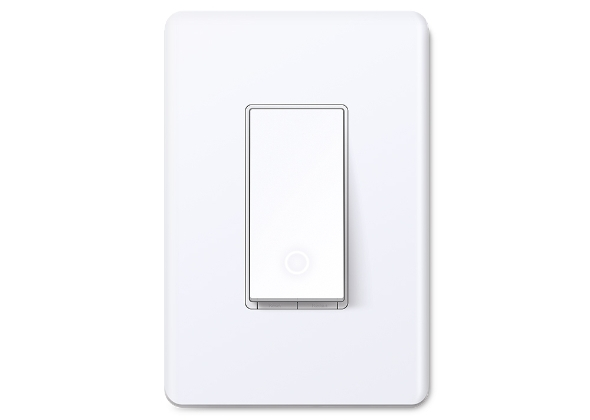
The TP-Link Kasa KS200 has earned its reputation as the most accessible and reliable "standard" smart switch on the market. It strikes a perfect balance between price, features, and ease of installation. Utilizing the 2.4 GHz Wi-Fi band, it connects directly to your home network without the need for a bridge. Technically, the KS200 is rated for 15A of general use, which is impressive for its price bracket, allowing it to control large banks of recessed lights or ceiling fans. The installation process is frequently cited as the best in the industry; the Kasa app provides a step-by-step visual guide that identifies wires by color and function, reducing the risk of wiring errors for DIY enthusiasts. Furthermore, the physical build quality is robust, with a mechanical relay that provides a satisfying "click" upon activation, signifying its heavy-duty internal components.
In terms of software, the Kasa ecosystem is exceptionally polished. It offers advanced scheduling, countdown timers, and an "Away Mode" that are all processed with high reliability. For those concerned with energy efficiency, the KS200 integrates seamlessly with the Kasa app's energy monitoring features (on supported models), allowing users to track usage patterns and optimize their home's power consumption. Compatibility is another strong suit, with native support for Amazon Alexa, Google Assistant, and Samsung SmartThings. While it lacks native HomeKit support in the base KS200 model, TP-Link offers a specific HomeKit version for those in the Apple ecosystem. The device's firmware is frequently updated, ensuring that security patches and performance improvements are delivered regularly to maintain network integrity.
The primary downside of the KS200 is its requirement for a neutral wire, which is a common limitation for Wi-Fi-based switches but remains a hurdle for older homes. Additionally, while the Wi-Fi connection is stable, it does not support the new Matter standard in the current hardware revision of the base KS200, which might be a consideration for those looking for maximum future-proofing. In high-density living situations, such as apartment complexes with dozens of competing Wi-Fi networks, the 2.4 GHz signal can occasionally face interference, leading to "Device Unreachable" errors. However, for the vast majority of suburban and modern homes, the Kasa KS200 offers a level of stability and ease of use that is hard to beat, making it the ideal "first smart switch" for most people.
TP-Link Official Product PageElectrical Specification: Load Inrush and Relay Durability
A critical technical detail of the KS200 is its relay design. High-efficiency LED bulbs have a unique electrical profile; when first turned on, they can draw an "inrush current" that is up to 50 times their steady-state operating current. This can weld the contacts of inferior relays shut, causing the switch to fail in the "on" position. TP-Link utilizes high-grade silver alloy contacts in the KS200's relay, which are specifically designed to resist arcing and welding during these high-inrush events. In laboratory endurance tests, these relays are rated for over 100,000 cycles, ensuring a lifespan that often exceeds a decade of regular daily use.
Best for Older Homes: GE Cync On/Off Smart Switch (No Neutral Required)
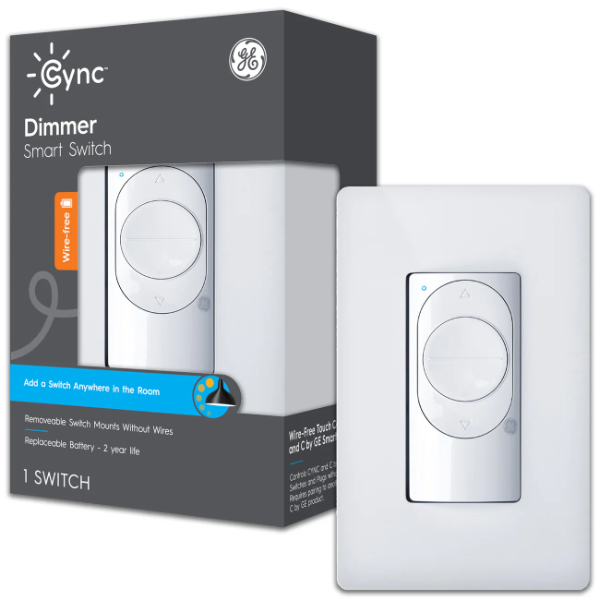
The GE Cync No Neutral Smart Switch is an engineering lifesaver for residents of older homes. Most smart switches require a neutral wire to provide a constant return path for power to the switch's internal radio. In homes built before the 1980s, the switch boxes often only contain a "line" and a "load" wire. The Cync switch solves this by using a sophisticated power-bypass method. It includes a small bulb adapter that is installed at the fixture, which allows a tiny amount of current to bypass the bulb and power the switch without causing the bulb to glow or flicker when turned off. This makes it one of the few Wi-Fi and Bluetooth-enabled switches that doesn't require a separate proprietary hub like Lutron does. It communicates directly with your smartphone for setup and connects to your 2.4 GHz Wi-Fi for remote control and voice integration with Alexa and Google Home.
One of the unique technical advantages of the Cync line is its "Smart Bulb Mode." If you have smart bulbs installed in a fixture controlled by this switch, you can configure the switch to never physically cut power to the bulbs. Instead, toggling the switch sends a wireless command to the bulbs to turn off. This solves the age-old smart home problem of someone flipping a switch and "killing" the smart bulb's connectivity. The switch itself has a classic, clean aesthetic with a light ring that changes color based on its status, providing a modern touch to any room. It also supports 3-way configurations wirelessly when paired with other Cync smart switches or remotes, eliminating the need for complex traveler-wire troubleshooting in older electrical systems.
However, there are some technical caveats to consider. The "no neutral" setup requires a minimum load of 15W. If your fixture uses ultra-efficient LED bulbs that fall below this threshold, the included adapter is mandatory to prevent flickering or "ghosting." Furthermore, the Cync app, while improved in recent years, can sometimes be less intuitive than the Kasa or Lutron alternatives during the initial pairing process. Because it relies on both Bluetooth (for setup) and Wi-Fi (for operation), ensuring your phone's permissions are correctly set is vital. It is also important to note that this switch requires a ground wire for safety and proper functioning of the RF shield. For homeowners who want the convenience of Wi-Fi control without the hassle of a hub or the expense of rewiring their home, the GE Cync is a robust and technically sound solution.
GE Cync Official Product PageEngineering Insight: The No-Neutral Power Bypass
The technical challenge of "No Neutral" Wi-Fi is significant because Wi-Fi radios are power-hungry compared to Zigbee or Clear Connect. To keep the Wi-Fi radio active without a neutral wire, the Cync switch must "leak" a small amount of current through the light bulb even when the switch is in the "OFF" state. On a standard LED, this leakage can cause the driver to partially charge its capacitors, leading to periodic flashes (the "strobe effect"). The Cync bulb adapter acts as a shunt, providing a low-impedance path for this leakage current that bypasses the bulb's driver entirely. This ensures that the switch stays connected to the network while the light remains completely dark.
Best for Smart Bulb Ecosystems: Philips Hue Wall Switch Module
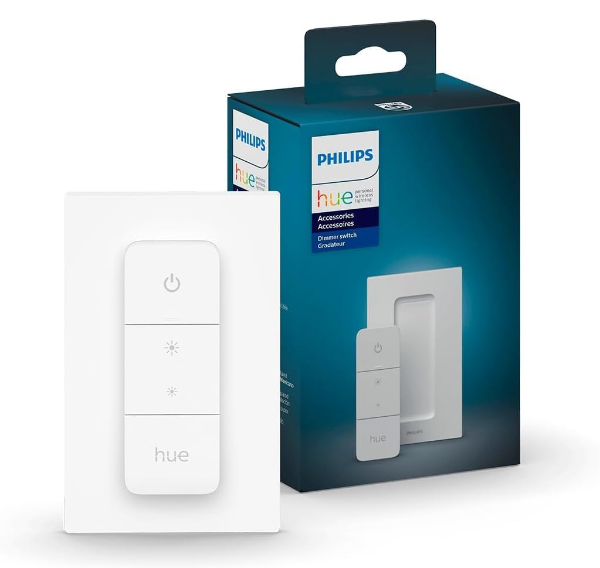
The Philips Hue Wall Switch Module is a fundamentally different type of smart device. Rather than replacing your physical switch, this small module is installed behind your existing switch - whether it's a toggle, a rocker, or a designer plate. The module connects to the terminals of your existing switch and turns it into a digital controller. Most importantly, the module allows you to hardwire your light fixture to "always-on" power. This means your Philips Hue smart bulbs never lose power, even if someone flips the physical switch on the wall. When the switch is toggled, the module sends a Zigbee signal to the Hue Bridge, which then tells the bulbs to turn on, off, or dim. This is the ultimate technical solution for households that love the color-changing capabilities of smart bulbs but hate the frustration of bulbs being "unreachable" because a switch was turned off.
Technically, the module is battery-powered, utilizing a CR2450 coin cell that is rated for a minimum of five years of use. Because it doesn't need to draw power from the electrical lines, it works in any home, regardless of whether a neutral wire is present. Once installed, the module is highly customizable through the Hue app. You can program it so that a single toggle turns the lights on, while multiple toggles cycle through different lighting scenes (e.g., "Relax," "Read," or "Concentrate"). This brings a level of functionality to a standard mechanical switch that was previously impossible. It communicates via Zigbee Light Link, ensuring a low-latency, mesh-networked connection that is incredibly stable when used with the required Philips Hue Bridge.
The limitations of the Hue Wall Switch Module are very specific. It is designed only to be used with Philips Hue smart bulbs or other Zigbee bulbs compatible with the Hue Bridge. It cannot control a standard "dumb" LED bulb, as it does not have an internal relay to cut the 120V power. Installation also requires a bit of manual wiring - specifically, using a provided wire nut to bypass the switch so the fixture has constant power - which might be intimidating for some. Additionally, the need for a battery means that eventually, every module in your home will require a physical maintenance visit to replace the coin cell. However, for those who are already invested in the Philips Hue ecosystem, this module is the missing link that combines the convenience of traditional wall control with the infinite possibilities of smart lighting.
Philips Hue Official Product PageProtocol Focus: Zigbee Mesh Networking
The Hue Wall Switch Module leverages the Zigbee 3.0 protocol, which is optimized for low-power, short-range communication. Unlike Wi-Fi, where every device talks directly to the router, Zigbee devices form a "mesh." Each mains-powered Hue bulb acts as a repeater, extending the range and reliability of the network. The Wall Switch Module, being a battery-powered "End Device," does not repeat signals, but it can find the nearest bulb to route its command to the Bridge. This architectural choice is why Hue systems can handle 50+ devices with significantly less congestion and higher reliability than a comparable Wi-Fi-only setup. According to the Zigbee Alliance, this mesh structure allows for "self-healing," meaning if one bulb is removed, the module will automatically find a new path to the Bridge within milliseconds.
How We Chose These Products
Our selection process involved a multi-stage technical filter to ensure only the most robust hardware was recommended. We began by auditing the current manufacturing status of over thirty smart switches to ensure every pick is actively supported by its maker. We prioritized products that offer verifiable manufacturer documentation, including detailed UL (Underwriters Laboratories) or ETL safety certifications. These certifications are non-negotiable for devices that handle high-voltage residential electricity. We then analyzed four primary performance criteria:
- Protocol Diversity: We ensured that our list includes the three dominant wireless standards: proprietary sub-GHz (Lutron), Wi-Fi (Leviton, TP-Link, GE), and Zigbee (Philips Hue). This allows users to choose based on their existing network architecture.
- Electrical Infrastructure Compatibility: We specifically sought out "No Neutral" options to accommodate the millions of homes with legacy wiring, while also including "Matter-ready" devices for those with modern infrastructure.
- Load Handling and Thermal Management: Switches were evaluated on their ability to manage resistive, inductive, and LED-specific loads. We favored models that utilize high-grade internal components capable of dissipating heat effectively within the confined space of a standard wall box.
- Ecosystem Openness: We prioritized products that integrate with the "Big Three" smart home platforms (Amazon Alexa, Google Assistant, and Apple HomeKit) to prevent ecosystem lock-in.
Comparison Overview
| Model | Protocol | Neutral Req. | Max Load | Ecosystems |
|---|---|---|---|---|
| Lutron Caseta | Clear Connect | No | 150W LED / 600W Inc. | All Major + Ring, Sonos |
| Leviton Decora 2nd Gen | Wi-Fi / Matter | Yes | 15A Resistive / 5A Ind. | All Major + Matter |
| TP-Link Kasa KS200 | Wi-Fi | Yes | 15A General Use | Alexa, Google, SmartThings |
| GE Cync No Neutral | Wi-Fi / BT | No | 150W LED / 600W Inc. | Alexa, Google |
| Hue Switch Module | Zigbee | N/A | N/A (Smart Bulbs Only) | Hue Ecosystem / HomeKit |
Buying Guide: What to Look For
Selecting the right smart switch requires an understanding of both your home's "hidden" electrical work and your long-term automation goals. Consider the following factors before making a purchase:
- The Neutral Wire Audit: This is the single most important step. Unscrew your current switch plate and look into the box. If you see a bundle of white wires that aren't connected to the switch, you have a neutral wire. If you only see black and red wires, you must choose a "No Neutral" model like the Lutron Caseta or the GE Cync.
- Total Load Calculation: Do not overload your switches. If you are controlling a chandelier with 12 bulbs, calculate the total wattage. While most smart switches handle 150W of LED easily, older incandescent fixtures can quickly exceed the 600W limit of many smart dimmers.
- Hub vs. Hubless: Hub-based systems (Lutron, Hue) are generally more stable and responsive but require an extra $50-$100 initial investment. Wi-Fi switches are cheaper and easier to start with but can become unreliable if you plan to install more than 20 devices on a standard router.
- 3-Way and 4-Way Support: If your light is controlled by more than one switch, you need to verify how the smart switch handles multi-way setups. Some require a specific "companion" switch, while others (like Lutron) use a wireless remote to replace the second switch location.
- Dimmability: Ensure your bulbs are explicitly labeled as "Dimmable." Using a smart dimmer with non-dimmable LED bulbs can cause permanent damage to the bulb's internal driver and the switch's TRIAC.
General Pro / Cons
| Strengths (Pros) | Weaknesses (Cons) |
|---|---|
| Maintain automation even when manual toggling occurs. | Requires physical installation involving high-voltage wiring. |
| Compatible with standard, inexpensive light bulbs. | Initial cost per switch is significantly higher than dumb switches. |
| Supports complex schedules and occupancy simulation. | Older homes often lack the necessary neutral wiring. |
| Local execution reduces latency in high-end models. | Wi-Fi congestion can lead to "ghosting" or unreachable devices. |
| Integrated dimming curves can extend bulb lifespan. | Firmware updates can occasionally introduce temporary bugs. |
| Voice control provides accessibility for those with limited mobility. | Some models require a proprietary hub for full functionality. |
| Physical switches provide an intuitive interface for guests. | Compatibility with different LED drivers can vary by brand. |
Final Summary
The transition to smart lighting is one of the most impactful upgrades you can make to a modern home, offering a blend of security, convenience, and energy efficiency. For those seeking absolute reliability and compatibility with older wiring, the Lutron Caseta system remains the undisputed leader. If you are a technology enthusiast looking to build a future-proof system based on open standards, the Leviton Decora Smart 2nd Gen with Matter support is the premier choice. For users deeply committed to the color and atmosphere provided by smart bulbs, the Philips Hue Wall Switch Module offers an invisible way to fix the "power cut" problem. Regardless of your choice, each of these products represents the current pinnacle of smart home engineering. Aggregate rating of the products reviewed: 4.68 out of 5.