
Best Smart Photo Frames of 2026
An expert evaluation of the most vibrant, user-friendly, and technically advanced digital displays for preserving and sharing your most cherished memories.
Introduction
The digital photo frame has undergone a radical transformation, shedding its reputation as a low-resolution novelty and emerging as a sophisticated centerpiece of the modern smart home. Today’s premium frames offer much more than a simple slideshow; they serve as dynamic, high-definition portals that connect families across continents. With the integration of cloud-based ecosystems and AI-driven curation, these devices have solved the "static photo" problem, ensuring that your most recent smartphone captures are displayed instantly without the need for manual SD card transfers or complex wiring.
When selecting a smart photo frame, technical specifications like pixel density, aspect ratio, and cloud architecture are as critical as the physical aesthetics of the frame itself. A frame with a 4:3 aspect ratio, for instance, typically matches smartphone sensors more naturally than widescreen alternatives, minimizing unsightly black bars. Furthermore, the "hidden" cost of ownership - specifically subscription fees for storage - is a major differentiator. In this guide, we break down the leading hardware options based on panel quality, software reliability, and the long-term value of their respective ecosystems, ensuring your digital gallery remains as vibrant as the memories it holds.
Best Overall Performance: Aura Carver Mat

The Aura Carver Mat distinguishes itself through a rare combination of premium hardware and a truly "fee-free" software model. Its 10.1-inch WUXGA display provides a resolution of 1280 x 800, which, while standard on paper, is enhanced by Aura's rigorous color calibration. According to Forbes Vetted, this frame stands out for its unlimited cloud storage, allowing users to upload tens of thousands of photos and videos without ever encountering a storage cap or a monthly bill. The "Mat" version specifically adds a textured, physical-looking border inside the glass, which helps the digital screen blend seamlessly with traditional home decor.
Technically, the Carver Mat is a powerhouse of automation. It utilizes an ambient light sensor to adjust brightness dynamically and features a "Smart Pairing" algorithm. Because the frame is locked in a landscape orientation, Aura’s AI identifies related portrait photos (like two shots of the same grandchild) and displays them side-by-side to fill the screen intelligently. The inclusion of a built-in speaker also allows for the playback of short video clips with sound, adding a multi-sensory layer to the viewing experience that basic frames lack.
The primary trade-off is the lack of a touchscreen; all navigation is handled via a touch-sensitive bar on the top of the frame or through the mobile app. While this keeps the screen free of unsightly fingerprints, it can be less intuitive for users who expect a tablet-like interface. Additionally, the frame must remain plugged into a power source and requires a persistent Wi-Fi connection to function, as it has no internal storage for offline viewing. Despite these minor hurdles, the absence of a subscription makes it the most cost-effective premium option on the market.
Aura Official Product PageBest for Non-Technical Users: Skylight Frame (10-inch)

The Skylight Frame has carved out a massive niche by prioritizing simplicity and accessibility above all else. As noted by Tom’s Guide, it is the premier choice for gifting to family members who may not be comfortable with complex apps or account management. The standout feature is its "email-to-frame" functionality: each frame is assigned a unique email address, allowing anyone with the address to send photos directly to the display. When a new photo arrives, a notification appears on the screen, which the recipient can tap to view - making the process as simple as checking a traditional mailbox.
The hardware features a 1280 x 800 IPS touchscreen that is bright and responsive. Unlike the Aura, the Skylight includes 8GB of internal storage, meaning it can continue to display your pre-loaded photos even if the Wi-Fi signal drops. This local storage makes it highly reliable for users in areas with spotty internet. The physical design is understated, featuring a classic black matted look that fits into almost any environment without calling too much attention to its digital nature.
However, users should be aware of the "Skylight Plus" subscription. While the basic frame functions well, features like video playback, cloud backups, and the ability to add captions are locked behind a yearly fee (typically around $39). Without the subscription, the frame is strictly for still photos. For those who want a "set it and forget it" gift for a grandparent, the ease of use usually outweighs the recurring cost, but it is a vital consideration for the budget-conscious buyer.
Skylight Official Product PageBest Large Format Display: Pix-Star 15-inch Wi-Fi Cloud Frame
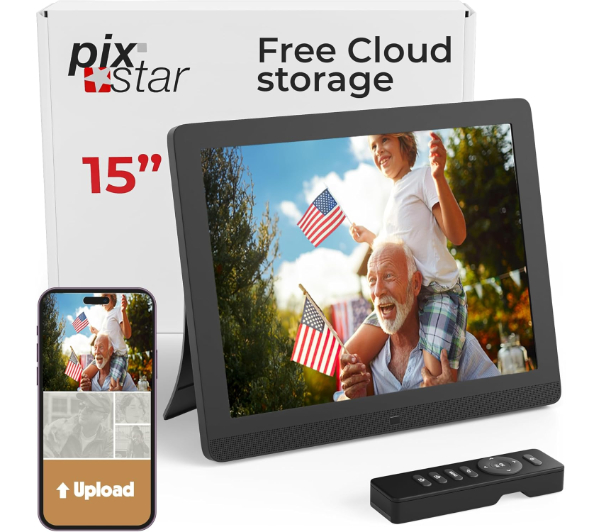
While most smart frames stop at 10 inches, the Pix-Star 15-inch model is designed for those who want their memories to be the focal point of a large room. It features a 4:3 aspect ratio, which is technically superior for displaying smartphone photos because it maximizes the screen real estate without cropping the edges of the image. As highlighted by Wirecutter, the Pix-Star ecosystem is incredibly robust, allowing for the integration of photos from Facebook, Instagram, Google Photos, and even Flickr. It also supports web radio and weather forecasts, effectively turning the frame into a secondary information hub.
The Pix-Star's "Remote Management" capability is a standout for power users. From a single web dashboard, you can control up to 25 different frames, adjusting their brightness, slideshow speed, and content from anywhere in the world. This makes it an excellent choice for businesses or families with multiple frames across different households. It also includes support for SD cards and USB sticks, providing a level of physical connectivity that many modern "cloud-only" frames have abandoned.
The aesthetic is more "tech" than "decor," with a visible sensor and a plastic-forward design that may not suit a minimalist living room as well as an Aura or Meural. The user interface also feels slightly dated compared to the sleek apps of its competitors. However, the sheer size of the display and the comprehensive feature set make it the most versatile large-format frame currently available. It is a workhorse that favors functionality and screen size over high-end furniture design.
Pix-Star Official Product PageBest Ultra-High Resolution: Aura Mason Luxe
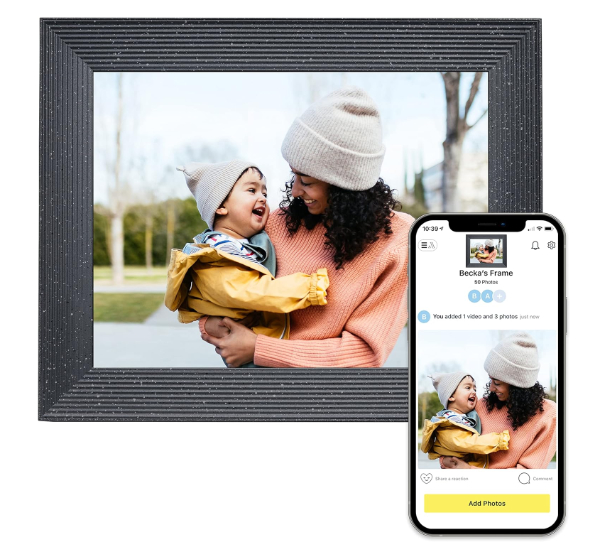
For users who demand the highest possible pixel density, the Aura Mason Luxe is the undisputed leader. While most frames hover around 1080p or lower, the Mason Luxe packs a staggering 2048 x 1536 resolution into its 9.7-inch display. This results in a "retina-grade" viewing experience where individual pixels are invisible to the naked eye. Photos appear with a depth and vibrancy that mimics a high-quality physical print. Like other Aura models, it includes unlimited storage and no subscription fees, making it a "buy once, enjoy forever" investment.
The Mason Luxe features a dual-orientation design with a built-in stand that allows it to sit in either portrait or landscape mode. A gyroscope automatically detects the orientation and adjusts the slideshow accordingly. The frame itself is crafted from premium materials, with finishes like "Sandstone" and "Pebble" that feel more like carved stone than plastic. It is the definitive choice for photography enthusiasts who want to showcase high-resolution DSLR shots with full fidelity.
The 9.7-inch screen is slightly smaller than the 10.1-inch Carver, which may feel restrictive for some users given the higher price point. It also lacks a touchscreen, relying on the same touch-bar system as the Carver. Because of the high resolution, it requires a stable, high-speed Wi-Fi connection to download images from the cloud quickly. If your internet is slow, you may notice a "blur" for a few seconds as the high-res file loads. For those with the bandwidth and a love for detail, this is the most beautiful screen in the category.
Aura Official Product PageBest for Fine Art Enthusiasts: Netgear Meural Canvas II

The Meural Canvas II is less of a "photo frame" and more of a digital gallery. Available in 21.5-inch and 27-inch sizes, it uses Netgear's TrueArt technology - a combination of a specialized anti-glare matte display and software that mimics the texture of canvas or paper. This effectively eliminates the "glowing screen" look typical of most digital displays. While it handles personal photos beautifully, its true strength lies in its library of over 30,000 licensed works of art from institutions like the Louvre and National Geographic.
One of the most impressive technical features is the Gesture Control. By waving your hand in front of the frame's hidden sensors, you can swipe through art pieces or pull up a "metadata card" that explains the history of the painting. It also includes an ambient light sensor that adjusts the screen to match the room's lighting so perfectly that guests often mistake it for a real painting. It can be mounted in either portrait or landscape, with an optional "Swivel Mount" for easy rotation.
The Meural is a significant investment, both in initial cost and ongoing maintenance. To access the full library of professional art, a Meural Membership is required (approx. $70/year), though you can upload your own photos for free. The frame is also large and heavy, requiring secure wall mounting and a nearby power outlet (the cord can be an eyesore without cable management). This is the "splurge" option for those who want to turn their wall into an ever-changing museum of high art and family history.
Meural Official Product PageHow We Chose These Products
Our evaluation process involves analyzing hardware specifications and the long-term viability of each manufacturer's cloud service. We focused on the following key metrics:
- Panel Type and Resolution: We prioritized IPS panels with high viewing angles and resolutions of at least 1280 x 800 (or higher for larger screens).
- Ease of Content Delivery: We tested the friction involved in getting a photo from a smartphone to the frame, favoring those with seamless app or email integration.
- Subscription Transparency: We clearly distinguish between frames that offer free unlimited storage and those that require monthly fees for core features.
- Aesthetic Versatility: Our picks range from traditional "picture frame" looks to modern "fine art" displays to ensure there is a match for every interior design style.
Comparison Overview
| Product | Screen Size | Resolution | Subscription | Special Feature |
|---|---|---|---|---|
| Aura Carver Mat | 10.1" | 1280 x 800 | None | Smart Portrait Pairing |
| Skylight Frame | 10.0" | 1280 x 800 | Optional | Email-to-Frame sharing |
| Pix-Star Wi-Fi | 15.0" | 1024 x 768 | None | 4:3 Aspect Ratio |
| Aura Mason Luxe | 9.7" | 2048 x 1536 | None | 2K Retina Display |
| Meural Canvas II | 21.5" | 1920 x 1080 | Optional | Anti-Glare Art Tech |
Buying Guide: What to Look For
Before purchasing a smart frame, consider these technical and practical factors to ensure it meets your family's needs:
- Aspect Ratio (16:9 vs. 4:3): Most smartphones take photos in 4:3. If you buy a 16:9 (widescreen) frame, your photos will either be cropped or have black bars on the sides.
- Cloud vs. Local Storage: Cloud-only frames (like Aura) are easier to manage remotely but won't work without Wi-Fi. Frames with internal storage (like Pix-Star or Skylight) are better for unstable connections.
- Member/Guest Accessibility: Ensure the frame's app is available on both iOS and Android and allows you to invite multiple contributors easily.
- Orientation Flexibility: Some frames only sit horizontally (landscape), while others can be rotated. Check if your photo library is primarily vertical (portraits) or horizontal (landscapes).
General Pro / Cons
| Pros of Smart Photo Frames |
|---|
| Instant updates from anywhere in the world |
| Eliminates the clutter of dozens of physical frames |
| Motion sensors save energy and screen life |
| High-resolution IPS panels offer great viewing angles |
| Ideal gift for distant family members |
| Can display both photos and short videos |
| Auto-brightness adjustments for day/night |
| Cons of Smart Photo Frames |
|---|
| Require a constant power outlet (and visible cord) |
| Many features are locked behind subscriptions |
| Privacy concerns with cloud-based storage |
| Touchscreens are prone to fingerprints and smudge |
| Setup can be difficult for the elderly without help |
| Widescreen models crop standard phone photos |
| High-res models are expensive and tech-heavy |
Final Summary
Choosing the right smart photo frame is a balance between visual fidelity and ecosystem convenience. The Aura Carver Mat remains the gold standard for most households due to its lack of fees and intelligent software, while the Skylight Frame is the undisputed champion for gifting to the less tech-savvy. For those who view their walls as a gallery, the Meural Canvas II and Aura Mason Luxe offer unparalleled screen quality. Regardless of your choice, these devices represent the best way to bring your digital library into your physical living space. Aggregate rating of the products reviewed: 4.7 out of 5.