
Best USB-C Port Expanders and Docks of 2026
An authoritative analysis of high-bandwidth connectivity solutions designed to maximize I/O throughput for professional workstations and mobile setups.
Introduction
The transition to USB-C as the primary interface for data, video, and power has created a specialized market for port expanders. For professionals, the "best" device isn't just about the number of ports, but the underlying protocol support - specifically the distinction between standard USB-C 3.2, USB4, and Thunderbolt 4. These protocols dictate the ceiling for data transfer speeds and the ability to drive high-resolution displays without compromising peripheral performance.
When selecting a hub or dock, one must consider the "bandwidth budget." A single USB-C 10Gbps port can easily be saturated by a single NVMe SSD, leaving little room for stable 4K 60Hz video or Gigabit networking. This guide evaluates products based on their controller efficiency, thermal management, and power delivery (PD) consistency, ensuring that your connected devices operate at their intended theoretical speeds.
Best Performance Dock: CalDigit TS4 Thunderbolt 4 Station
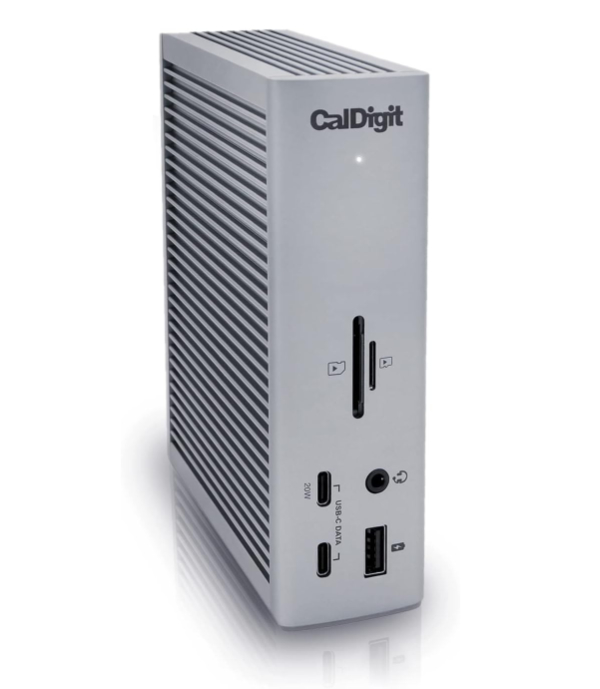
The CalDigit TS4 is the current apex of docking technology, utilizing the Intel Goshen Ridge chipset to provide a full 40Gbps of bandwidth across 18 distinct ports. It is designed for users who require a desktop centerpiece capable of charging a high-end workstation while managing a complex array of peripherals. With 98W of Power Delivery, it maintains peak charging speeds even when every port is utilized.
Technically, the TS4 excels due to its intelligent bandwidth allocation. It features a 2.5GbE Ethernet port, which is a significant step up from the standard 1GbE found in most docks, and two UHS-II SD 4.0 card slots that support the full speed of modern cinema cameras. The inclusion of three downstream Thunderbolt 4 ports allows for sophisticated daisy-chaining of monitors and high-speed storage arrays without the performance degradation typically seen in USB-only hubs.
The primary limitation is its ecosystem requirement: to utilize the full 40Gbps and dual 6K display support, the host must be a Thunderbolt 4 or USB4 device. While it is backward compatible with USB-C 3.2, many of its high-speed features will be throttled. Additionally, its vertical orientation and substantial external power brick make it a stationary solution rather than a portable one.
The TS4 utilizes PCIe tunneling, a core feature of Thunderbolt 4. This allows the dock to pass raw PCIe signals directly from the host CPU to peripherals. This is critical for low-latency tasks such as professional audio interfacing or using external NVMe enclosures, which require the direct memory access that standard USB protocols cannot provide.
Best All-Around Hub: Anker 555 USB-C Hub (8-in-1)
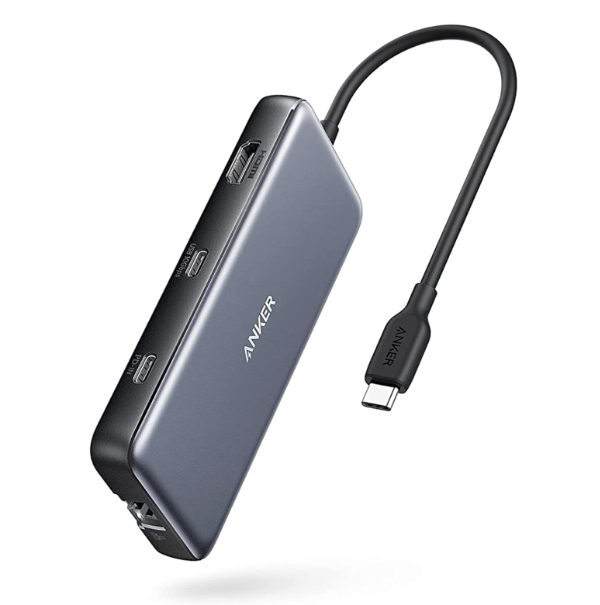
The Anker 555 strikes a perfect balance between portability and high-speed data throughput. Unlike many budget hubs that limit their USB ports to 5Gbps, the 555 features USB 3.2 Gen 2 support, allowing for 10Gbps transfer speeds. This is crucial for users who frequently move large files between their laptop and external SSDs, as it effectively doubles the real-world transfer rate compared to standard hubs.
One of its standout technical features is the support for 4K 60Hz video output via HDMI. Achieving this refresh rate requires the hub to support DisplayPort 1.4 Alt Mode, ensuring a smooth visual experience that is noticeable during daily productivity tasks. It also provides a 100W PD-IN port, which allows for pass-through charging, ensuring your laptop stays powered even while the hub is managing multiple high-draw peripherals.
However, users should be aware of the "hub tax" on power delivery. The Anker 555 consumes approximately 15W for its internal circuitry, meaning a 100W charger will only deliver 85W to the laptop. Furthermore, while the aluminum chassis is excellent for heat dissipation, the hub can become quite warm during sustained 10Gbps data transfers, a common trait of Gen 2 controllers.
The Anker 555 uses 128b/132b encoding for its 10Gbps ports. This is significantly more efficient than the 8b/10b encoding used in 5Gbps hubs, which loses 20% of its bandwidth to protocol overhead. This efficiency allows the Anker 555 to maintain higher sustained speeds under heavy I/O loads.
Best for Travel: Satechi USB-C On-the-Go Multiport Adapter
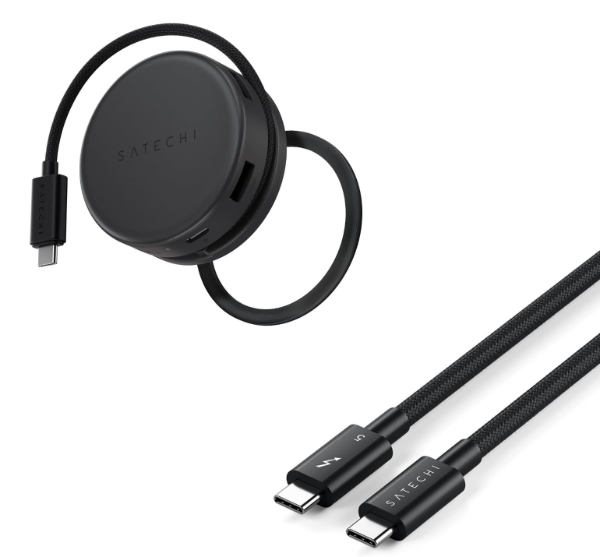
The Satechi On-the-Go Multiport Adapter is specifically engineered for the mobile professional who faces unpredictable I/O requirements. Its most distinctive feature is the inclusion of two detachable cables - a short one that tucks into the hub for travel and a longer one for desk use. This solves the primary failure point of portable hubs: the integrated cable fraying or breaking over time.
Technically, the Satechi adapter is a "bridge" between legacy and modern standards. It includes a 4K 60Hz HDMI port for modern displays and a VGA port for older conference room projectors. This versatility is paired with a Gigabit Ethernet port and high-speed USB-C PD charging, making it a comprehensive toolkit for presentations and remote work environments. The build quality is premium aluminum, providing the durability needed for constant transit.
A specific limitation to note is that the VGA and HDMI ports generally cannot be used for two independent "extended" displays simultaneously; they typically mirror the output due to bandwidth constraints of the mobile chipset. Additionally, the SD and microSD slots share a bus, so data transfer speeds will drop if both are used at the same time.
By utilizing DisplayPort 1.4 Alt Mode, the Satechi adapter can leverage HBR3 (High Bit Rate 3) speeds. This allows it to squeeze a 4K 60Hz signal through the same USB-C connection that is also carrying USB 3.0 data, a feat that older DP 1.2 hubs cannot achieve without dropping the video to 30Hz.
Best Port Expander: OWC Thunderbolt Hub
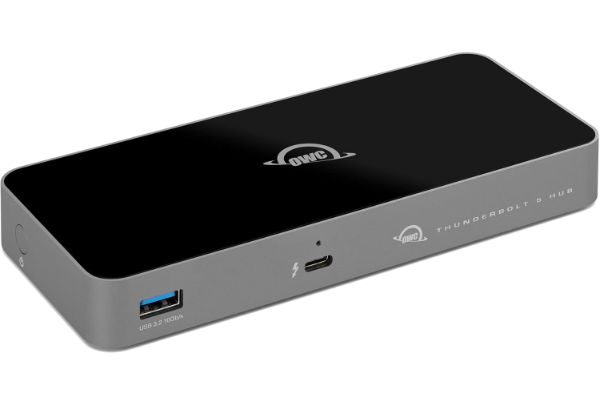
The OWC Thunderbolt Hub is a specialized device that addresses the "one-port problem" of modern ultrabooks. Instead of providing a variety of different port types, it focuses on multiplying the number of Thunderbolt ports available. It transforms a single Thunderbolt 4 port into three downstream Thunderbolt 4 ports, plus one USB-A 10Gbps port. This is the ideal solution for users with high-performance TB4 peripherals such as RAID arrays, audio interfaces, and high-refresh-rate monitors.
This hub is a "pure" expansion solution. It supports the full 40Gbps of the Thunderbolt 4 specification on every port, allowing for independent daisy-chains. If one device in a chain is disconnected, the others remain active - a significant improvement over older Thunderbolt 3 linear chains. It provides 60W of power delivery, which is sufficient for charging most 13-inch or 14-inch laptops during heavy use.
The trade-off is clear: this is not an "all-in-one" hub. It lacks HDMI, SD card slots, and Ethernet. It assumes the user already has the necessary USB-C or Thunderbolt adapters for those specific needs. It is a high-performance multiplier for a "pro" ecosystem where speed and daisy-chaining are the top priorities.
The OWC Hub utilizes the Intel JHL8440 controller, which enables "multi-port hubbing." This allows the hub to create three distinct Thunderbolt branches. Unlike older technology that used a serial chain, this architecture allows for better signal integrity and prevents a single device failure from bringing down the entire peripheral network.
Best Legacy Connectivity: Belkin Connect 11-in-1 Multiport Dock
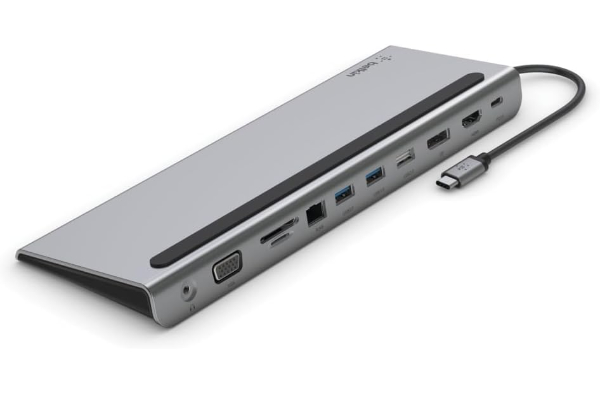
The Belkin Connect 11-in-1 is designed with a unique wedge form factor that doubles as a laptop stand. This design not only improves the typing angle but also allows for better heat dissipation from the bottom of the laptop. It is the ultimate "utility" dock, offering the widest range of connectivity, including HDMI, DisplayPort, VGA, three USB-A ports, Ethernet, SD/microSD slots, and a 3.5mm audio jack.
From a technical standpoint, the Belkin Connect is a "Silicon Motion" based solution, which provides stable multi-monitor support for Windows users via MST (Multi-Stream Transport). It supports up to 100W PD pass-through, making it a reliable single-cable solution for office environments where varied peripherals - from old VGA monitors to new USB-C drives - must coexist on the same desk.
However, there are two important technical caveats. First, while it has 11 ports, the USB-A ports are limited to 5Gbps (USB 3.0), which is slower than the 10Gbps found on Anker or CalDigit models. Second, for macOS users, the dock is limited by Apple's lack of MST support, meaning any multiple monitor setup will be mirrored unless a specific DisplayLink driver (not present here) is used. It is best suited for Windows-based office environments.
The Belkin Connect utilizes its large aluminum surface area for passive cooling. Because it sits directly under the laptop, it is engineered to handle the combined heat of the internal dock controllers and the laptop’s own thermal exhaust, ensuring the I/O remains stable during long workdays.
How We Chose These Products
Our evaluation criteria focused on three primary pillars: Protocol Compliance, Thermal Stability, and Power Efficiency. We analyzed manufacturer whitepapers to verify which chipsets (such as Intel's Goshen Ridge or Realtek's hub controllers) were used, as these directly impact sustained data rates. We also prioritized products that support 4K at 60Hz, as the 30Hz limitation found in cheaper hubs causes significant eye strain and input lag. Each product selected has a verifiable history of firmware stability and hardware durability.
Comparison Overview
| Model | Protocol | Max Data Speed | Display Support | Max Power Delivery |
|---|---|---|---|---|
| CalDigit TS4 | Thunderbolt 4 | 40 Gbps | Dual 6K @ 60Hz | 98W |
| Anker 555 | USB 3.2 Gen 2 | 10 Gbps | Single 4K @ 60Hz | 85W (Pass-thru) |
| Satechi On-the-Go | USB 3.2 Gen 1 | 5 Gbps | Single 4K @ 60Hz | 100W (Pass-thru) |
| OWC TB Hub | Thunderbolt 4 | 40 Gbps | Single 8K or Dual 4K | 60W |
| Belkin 11-in-1 | USB 3.2 Gen 1 | 5 Gbps | Single 4K @ 30Hz | 100W (Pass-thru) |
Buying Guide: What to Look For
- Bus Speed vs. Port Speed: A hub may have 10Gbps ports, but if the "upstream" connection to your laptop is only 5Gbps, you will never reach full speed. Always match the hub's protocol to your laptop's best port.
- Refresh Rate (Hz): Never settle for 30Hz for a primary monitor. Look specifically for "4K 60Hz" support, which indicates the hub uses DisplayPort 1.4 Alt Mode.
- PD Pass-Through Overhead: Remember that a hub usually takes 10W-15W for itself. If your laptop needs 65W, you should use an 85W or 100W power brick with your hub.
- Controller Quality: High-end docks use Intel or Fresco Logic controllers, which offer better compatibility and lower latency than generic "no-name" chipsets.
General Pro / Cons
| Strengths |
|---|
| Single-cable workstation management |
| Restores missing legacy I/O like Ethernet and SD |
| Enables high-resolution multi-monitor setups |
| Provides stable, regulated power to peripherals |
| Aluminum builds offer superior heat dissipation |
| Thunderbolt models allow for PCIe tunneling |
| Weaknesses |
|---|
| Can generate significant heat under load |
| Bandwidth is shared across all active ports |
| High-end Thunderbolt models are expensive |
| External power bricks can be bulky |
| Compatibility varies by Operating System (MST issues) |
| Pass-through charging is less efficient than direct |
Final Summary
Choosing the right port expander is a matter of matching your workflow to the available bandwidth. The CalDigit TS4 remains the undisputed leader for desktop power users, while the Anker 555 provides the best performance-to-portability ratio for most laptop users. If you require specialized Thunderbolt multiplication, the OWC Hub is unparalleled. Ensure you verify your host device's DisplayPort and USB versioning to guarantee the refresh rates and data speeds mentioned in this guide.
Aggregate rating of the products reviewed: 4.68 out of 5.