
Best Video Streaming Devices of 2026
An exhaustive analysis of the leading hardware platforms for high-fidelity 4K playback, lossless audio passthrough, and seamless smart-home integration.
Introduction
The landscape of home entertainment has shifted from physical media to high-bitrate digital distribution, making the choice of a streaming device the most critical link in your home theater chain. Modern hardware has advanced far beyond basic "smart TV" apps, which often suffer from sluggish interfaces and limited manufacturer support life cycles. A dedicated streaming box or stick provides the specialized processing power necessary to handle complex HDR metadata, spatial audio formats like Dolby Atmos, and high-frequency frame-rate matching that integrated solutions frequently skip.
Technically, the market is divided between HDMI-stick form factors and more robust "set-top" boxes. While sticks offer convenience, the larger desktop units generally feature superior thermal management and significantly higher RAM and internal storage, which prevents the interface lag that degrades the user experience over time. Our evaluation focuses on decoding efficiency, wireless connectivity standards—such as Wi-Fi 6 and 6E—and the specific ecosystem advantages each platform provides, from Apple's privacy-centric tvOS to the open-source flexibility of Android-based systems.
Best Overall Performance: Apple TV 4K (3rd Generation)
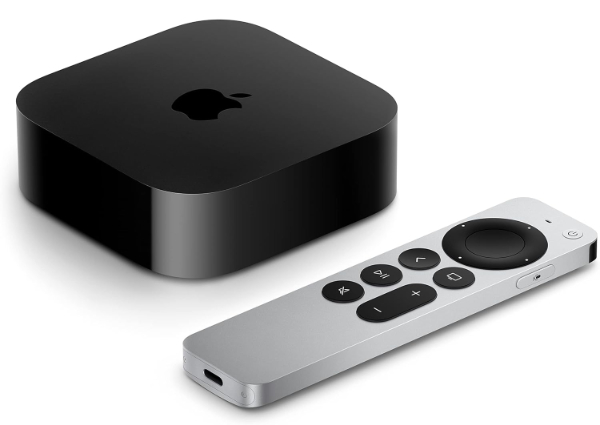
The Apple TV 4K (3rd Generation) remains the high-water mark for hardware-software synergy in the streaming space. Powered by the A15 Bionic chip—the same silicon found in the iPhone 13—this device offers a level of overhead that ensures the tvOS interface remains fluid regardless of the number of active apps. It is one of the few consumer devices that successfully implements system-wide frame-rate and dynamic range matching, ensuring that content is viewed at its native 24fps or 30fps without the judder typical of 60Hz pulldown. Furthermore, it supports the HDMI 2.1 QMS (Quick Media Switching) standard, which eliminates the "black screen" pause when switching between frame rates on compatible TVs.
For audio enthusiasts, the device supports Dolby Atmos and Apple’s proprietary Spatial Audio, which creates an immersive soundstage when paired with AirPods or HomePods. The Apple TV 4K also acts as a robust smart-home hub, featuring a built-in Thread radio and support for Matter, allowing it to control a wide array of IoT devices even when you are away from home. As noted by What Hi-Fi?, the picture performance is exceptionally natural, with balanced color grading and sharp detail that often surpasses the internal apps of flagship OLED televisions.
The primary limitation is the inherent "walled garden" of the Apple ecosystem. While it supports all major streaming services, features like HomeKit secure video and Apple Fitness+ require other Apple hardware to function. Additionally, while it supports Dolby Atmos via E-AC3 (streaming), it does not support lossless Atmos passthrough (TrueHD) for local media enthusiasts using Plex. It is available in two configurations: a 64GB Wi-Fi model and a 128GB model that includes an Ethernet port and Thread networking support.
Apple Official Product PageBest for Enthusiasts and Plex: NVIDIA Shield TV Pro
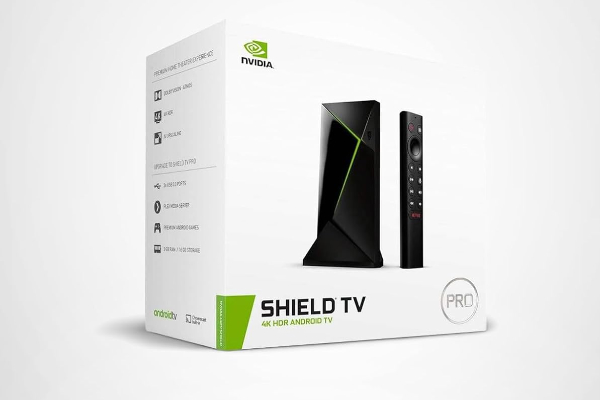
The NVIDIA Shield TV Pro is the definitive choice for users with extensive local media libraries or high-end home theater setups. It remains the only major streaming device that supports full lossless audio passthrough for both Dolby TrueHD (with Atmos) and DTS-HD Master Audio (with DTS:X). This makes it indispensable for anyone running a Plex or Kodi server. Technically, its Tegra X1+ processor enables a unique "AI-enhanced upscaling" feature that uses a trained neural network to add detail and sharpness to 720p and 1080p content, making older movies look remarkably close to native 4K.
Beyond its media prowess, the Shield TV Pro is a legitimate gaming machine. It natively supports NVIDIA GeForce NOW, allowing users to stream high-performance PC games at 4K resolution with minimal latency. It also features two USB 3.0 ports, which can be used to connect external hard drives or act as a SmartThings hub via a compatible dongle. According to reports from XDA Developers, the Shield remains the most consistently updated Android-based device in history, receiving software support for over a decade since its original launch architecture.
However, the hardware is beginning to show its age in specific areas. It lacks support for the AV1 codec, which is becoming the standard for efficient 4K streaming on YouTube and Netflix. The interface, now integrated with Google TV elements, is more ad-heavy than it was in previous iterations. Users should also be aware that its HDMI port is 2.0b, not 2.1, which limits its ability to handle 4K at 120Hz, though this is rarely a bottleneck for cinematic content restricted to 60Hz or lower.
NVIDIA Official Product PageBest Smart Home Integration: Google TV Streamer
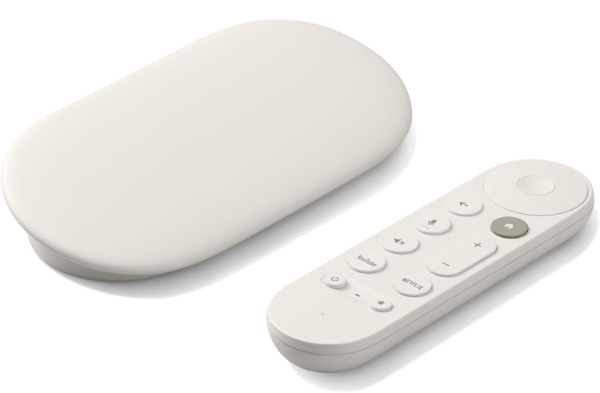
The Google TV Streamer is the successor to the Chromecast lineage, moving from a hidden dongle to a stylish set-top box. This transition allowed Google to pack in significantly more powerful hardware, including 4GB of RAM and 32GB of internal storage—quadruple what was available on previous models. This extra headroom is utilized by Gemini, Google’s AI, which provides deeply personalized content summaries and refined recommendations across all installed streaming services. As noted by Android Headlines, the device serves as a central hub for the Google Home ecosystem, featuring a dedicated Home Panel that allows users to monitor Nest cameras or dim lights directly from the TV screen.
Technically, the Streamer includes a built-in Thread border router and supports the Matter protocol, making it a future-proof anchor for a smart home. It supports 4K HDR at 60fps with full Dolby Vision and HDR10+ compatibility. A major practical improvement is the inclusion of an integrated Ethernet port on the back of the device, eliminating the need for separate power-plus-ethernet adapters. The remote has also been redesigned with a textured back and a customizable shortcut button that can be mapped to a specific app or the smart home dashboard.
One caveat is the continued use of an older processor architecture, which, while capable, does not quite match the raw compute power of the A15 or the Tegra X1+ for gaming. Furthermore, the Google TV interface remains heavily reliant on data collection for its recommendation engine, which may be a concern for privacy-focused users. It is an ideal pick for those already invested in the Google/Nest ecosystem who want a cohesive, AI-augmented entertainment experience.
Google Official Product PageBest User Interface Simplicity: Roku Ultra (2024 Model)
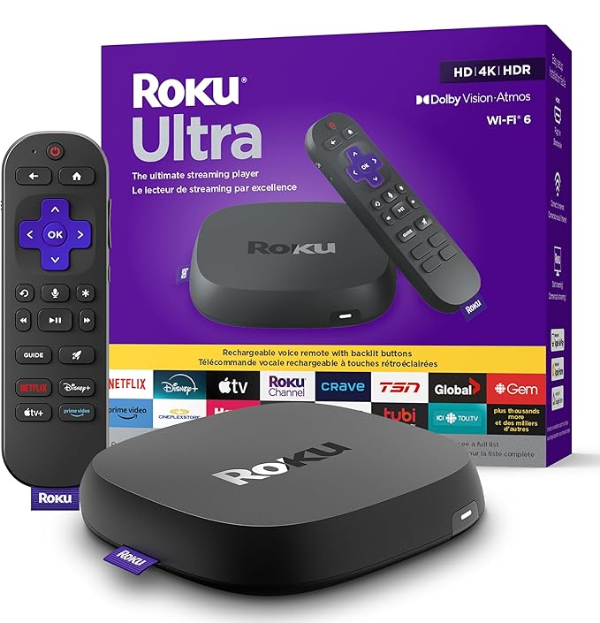
The 2024 Roku Ultra is the choice for users who want the most straightforward, distraction-free interface possible. While Google, Amazon, and Apple continue to push AI-driven "What to Watch" rows, Roku maintains its classic grid of apps. The 2024 model is approximately 30% faster than its predecessor, thanks to a new quad-core processor that significantly reduces app load times. It is a full-featured 4K HDR device that supports Dolby Vision, HDR10+, and Dolby Atmos. A unique feature of the Ultra is its inclusion of the Roku Voice Remote Pro (2nd Edition), which features backlit buttons and a rechargeable battery via USB-C.
From a technical standpoint, the Ultra stands out with its connectivity options. It supports Wi-Fi 6, which is crucial for maintaining 4K bitrates in crowded wireless environments. It also retains a physical Ethernet port and a USB port for local media playback. A favorite feature for many is the "lost remote finder" button on the box itself, which causes the remote to emit a chime. According to specs provided by Abt, the 2024 model also introduces an improved Bluetooth implementation, allowing for more stable "Private Listening" via the Roku mobile app or direct headphone pairing.
The simplicity of Roku is its greatest strength but also its primary limitation. The OS feels somewhat dated compared to the dynamic layouts of tvOS or Google TV. Additionally, Roku has a history of carriage disputes with major apps (though none are currently active), and the platform lacks the deep smart-home integration found in Google or Apple’s offerings. It remains, however, the most reliable and easy-to-teach device for families or less tech-savvy users.
Roku Official Product PageBest Mid-Range Value: Amazon Fire TV Stick 4K Max (2nd Gen)
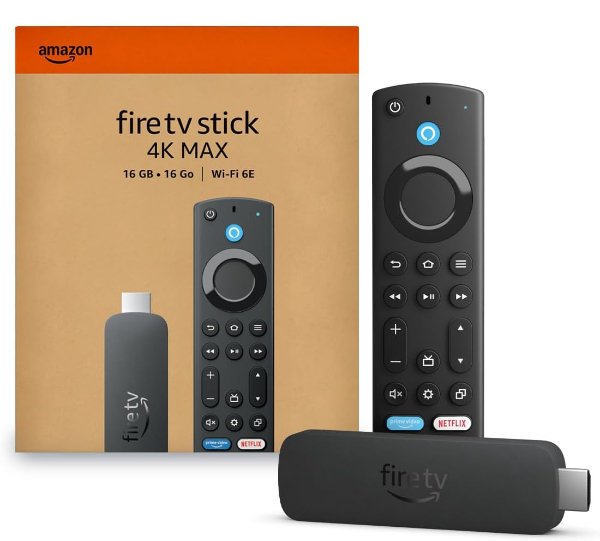
The second-generation Fire TV Stick 4K Max provides premium features at a stick-based price point. It is the only stick in its category to support Wi-Fi 6E, which utilizes the 6GHz band to virtually eliminate interference from other home devices. This is paired with a 2.0GHz quad-core processor that supports the "Fire TV Ambient Experience," which turns your TV into a smart display showing artwork, widgets, and smart home status when not in use. As reported by Pocket-lint, the 4K Max now also supports NVIDIA GeForce NOW and Xbox Game Pass, making it a highly portable gaming hub for cloud-based play.
Technically, the device is impressively comprehensive, supporting Dolby Vision, HDR10+, HLG, and Dolby Atmos audio. It features 16GB of internal storage—double that of the standard 4K stick—which provides more room for apps and system updates. Its integration with Alexa is the most advanced of any streaming device, allowing for "picture-in-picture" views of Ring doorbells or front-door cameras while you continue to watch a movie. The included Alexa Voice Remote Enhanced includes dedicated buttons for recent apps and a channel guide for live TV services.
The main drawback of the Fire TV ecosystem is the aggressive advertising. The home screen is heavily dominated by Amazon-recommended content and "sponsored" tiles, which can make it difficult to find your own apps. Additionally, the stick form factor can sometimes block adjacent HDMI ports on some televisions, requiring the use of the included small HDMI extender. Despite these UI frustrations, the raw hardware performance per dollar is virtually unbeatable, particularly for Prime members who benefit from the deep Alexa integration.
Amazon Official Product PageHow We Chose These Products
Our selection process involved a rigorous evaluation of hardware benchmarks and software longevity. We prioritized devices that provide a distinct technical advantage over integrated Smart TV platforms. The criteria included:
- Processing Overhead: We selected devices with chips (A15 Bionic, Tegra X1+, etc.) capable of maintaining 60fps UI navigation.
- Format Support: Every device on this list supports the four pillars of modern 4K: HDR10, Dolby Vision, HLG, and Dolby Atmos.
- Wireless Standards: We prioritized units supporting Wi-Fi 6 or 6E to ensure stable 4K bitrates in modern home environments.
- Manufacturer Support: We only recommended products from manufacturers with a proven history of multi-year security and feature updates.
Comparison Overview
| Model | Processor | RAM / Storage | Connectivity | Key Strength |
|---|---|---|---|---|
| Apple TV 4K | A15 Bionic | 4GB / 128GB | Wi-Fi 6 / Thread | Speed & Ecosystem |
| NVIDIA Shield Pro | Tegra X1+ | 3GB / 16GB | Wi-Fi 5 / GbE | Lossless Audio |
| Google TV Streamer | Quad-core 2.0GHz | 4GB / 32GB | Wi-Fi 5 / Thread | AI & Smart Home |
| Roku Ultra 2024 | Quad-core (New) | 2GB / 4GB | Wi-Fi 6 / GbE | Simplicity |
| Fire Stick 4K Max | Quad-core 2.0GHz | 2GB / 16GB | Wi-Fi 6E | Value & Portability |
Buying Guide: What to Look For
- Frame Rate Matching: Look for devices that support "Match Content Frame Rate." This ensures 24p cinematic content is not displayed with the stutter of 60p pulldown.
- Storage Requirements: If you plan to install many apps or games, aim for at least 32GB of storage. 8GB (standard on many sticks) fills up quickly with cache data.
- Codec Support: Ensure the device supports AV1. Most modern streaming services are moving to this codec for higher quality at lower bandwidth.
- Ecosystem Lock-in: Consider your existing devices. Apple TV works best with iPhones/AirPods, while Google TV Streamer is the superior choice for Nest camera users.
- Remote Quality: Don't overlook the remote. Backlit buttons and "lost remote finders" are high-value features that significantly improve daily use.
General Pros / Cons
| Advantages |
|---|
| Superior UI speed compared to Smart TV apps |
| Advanced HDR format support (Dolby Vision/HDR10+) |
| System-wide search across multiple services |
| Regular security and feature updates |
| High-quality wireless (Wi-Fi 6/6E) connectivity |
| Integration with smart home hubs and cameras |
| Capability for high-end cloud and native gaming |
| Access to specialized media apps like Plex and Kodi |
| Disadvantages |
|---|
| Additional cost over existing TV software |
| Occupies an HDMI port and power outlet |
| Ecosystem silos can restrict certain features |
| Some interfaces are heavily ad-supported |
| Lossless audio support is rare (Shield only) |
| Privacy concerns regarding data collection |
| Occasional HDMI-CEC conflicts with AV receivers |
| Remote controls are easily lost or damaged |
Final Summary
The current market for streaming devices offers specialized solutions for every type of viewer. For those who prioritize a premium, ad-free experience and are within the Apple ecosystem, the Apple TV 4K is the definitive choice. Home theater enthusiasts who demand lossless audio passthrough will find no substitute for the NVIDIA Shield TV Pro. Meanwhile, the Google TV Streamer and Amazon Fire TV Stick 4K Max offer the best balance of AI-driven features and value, respectively. For the user who just wants to click and watch, the Roku Ultra remains the gold standard of simplicity.
Aggregate rating of the products reviewed: 4.62 out of 5.